teaching_llm_agents
Claude tools
-
Claude.ai/Claude Desktop, the Claude API, Claude Code, and the Claude Agent SDK
Skills
-
📝
SKILLS.mdFile which should have the skills. This will have all the instructions to perform the tasks. -
nameanddescriptionare required (YAML format) -
referencesfolder should have file which is referenced in .md format -
put all these in another folder 📁 (named with the same name as the skill), zip it
-
⬆️📎 Upload this zipped file to Claude >
capabilities>Skills -
Concept 🧩🚀 Skills are an open standard and are supported in
Claude,Gemini, etc. -
You want to keep system prompts slim. Put stable procedures in skills; keep system prompts for global behavior.
-
🧩🚀 Multiple agents or teams share the same house style. Skills are a nice
org standard librarypattern. -
Also good for reproducibility
-
You want a reusable, independently versionable set of behaviours
-
Consider pinning the model and skill version together for reproducible behavior across deployments.
-
If the system prompt repeats the entire procedure, people will: Bypass skills and Stuff logic into tool schemas. And you lose the whole point (reusability + versioning + conditional invocation) of skills. Keep the system prompt content separate.
-
Your workflow is highly conditional, or branches like a complex flow chart. Example: If X → do this; else if Y → do that; plus validation + retries.
-
Skills are less ideal if it is a one-off task
-
🧩🚀 Skills are less ideal if you need live data side effects (that would be a
tool call) -
Folder Structure for a Skill
A skill is just a folder bundle. A typical skill folder may contain:
my-skill/
├── SKILL.md              # Required: main instruction file
├── scripts/              # Optional: code files
│   ├── example.py
│   └── example.js
├── helpers/              # Optional: helper modules and dependencies
│   └── requirements.txt
├── assets/               # Optional: images, data files, templates
│   ├── sample_input.json
│   └── template.md
└── README.md             # Optional: human-readable overview
- An example
SKILLS.mdfile is here
---
name: academic-grant-writer
description: Transform Markdown notes (ideas, outlines, meeting notes) into a polished academic grant proposal in LaTeX with a corresponding BibTeX file.
version: 1.0
---

# Skill: Academic Grant Writing from Notes

## Purpose

Transform one or more Markdown inputs containing ideas, outlines, meeting notes, rough drafts, and reference fragments into a polished academic grant proposal written in LaTeX, with a matching BibTeX file.

## Input Format

The input directory may contain any of the following Markdown files:

- `ideas.md`
- `outline.md`
- `meeting-notes.md`
- `references.md`
- `draft.md`
- other `.md` files containing relevant project material

These files may be incomplete, repetitive, messy, or contradictory. Your job is to synthesize them into a coherent grant application.

## Output Format

Produce:

- `grant.tex` — the main LaTeX document
- `references.bib` — BibTeX entries for all cited sources
- optionally:
  - `sections/` for modular LaTeX files such as `sections/abstract.tex`, `sections/methods.tex`
  - `appendix.tex` if needed

The main output should be a clean, compile-ready LaTeX manuscript.

## Core Task

Use the Markdown notes to draft a grant proposal with the following qualities:

- clear research vision
- strong motivation and significance
- feasible work plan
- well-structured methodology
- explicit expected outcomes and impact
- academically polished language
- consistent terminology throughout

## Preferred Grant Structure

Unless the user specifies otherwise, use this structure:

1. Title
2. Abstract
3. Background and Motivation
4. Research Questions / Aims
5. Methodology / Work Packages
6. Expected Contributions / Impact
7. Timeline
8. Risks and Mitigation
9. References

If the notes suggest a different funding format, adapt accordingly.

## Writing Rules

- Preserve the user’s intent and domain-specific terminology.
- Turn fragments into full academic prose.
- Do not invent claims, results, or citations.
- Flag uncertainty where the notes are ambiguous.
- Prefer precise, formal, grant-style language.
- Remove redundancy and combine repeated ideas.
- Keep the proposal internally consistent.
- Make the narrative persuasive but not overstated.

## Citation Rules

- Any factual claim that depends on external literature should be supported by a BibTeX entry.
- If a reference is mentioned in the notes but incomplete, do one of:
  - infer the likely citation only if highly confident, or
  - mark it clearly as `TODO` in the BibTeX file.
- Never fabricate publication details.
- Ensure every in-text citation key used in `grant.tex` exists in `references.bib`.

## LaTeX Rules

- Use standard, minimal LaTeX packages unless the grant format requires otherwise.
- Keep the document compile-ready.
- Prefer semantic structure:
  - `\section{}`
  - `\subsection{}`
  - `\paragraph{}`
- Use `\cite{}` for references.
- Avoid overcomplicated macros unless useful.
- If equations, tables, or figures are needed, include them only when supported by the notes.

## BibTeX Rules

- Extract all explicit references from the notes.
- Consolidate duplicate citations into one canonical entry.
- Use consistent BibTeX keys, for example:
  - `smith2022robustness`
  - `doe2021multiagent`
- If a citation is known only partially, keep the entry marked clearly for later completion.

## Workflow

1. Read all Markdown inputs.
2. Identify:
   - project goal
   - research problem
   - contributions
   - methods
   - required references
   - missing information
3. Draft a concise but compelling grant narrative.
4. Convert all bibliographic mentions into BibTeX entries.
5. Write the final LaTeX and BibTeX outputs.
6. Check consistency:
   - names
   - acronyms
   - citations
   - section ordering
   - terminology
7. Ensure the output compiles cleanly.

## Style Guidance

Write in a tone that is:

- professional
- precise
- credible
- concise
- academically persuasive

Avoid:

- hype
- vague language
- unsupported promises
- repetitive phrasing
- overlong sentences

## Handling Incomplete Notes

When the notes are incomplete:

- infer structure from context
- keep placeholders for unknown details
- make assumptions explicit only when necessary
- prefer conservative, defensible wording over guesswork

Examples of acceptable placeholders:

- `[FUNDING SCHEME]`
- `[PROJECT DURATION]`
- `[NAME OF HOST INSTITUTION]`
- `[REFERENCE NEEDED]`

## Quality Checklist

Before finishing, verify:

- the proposal has a clear argument
- the research questions are explicit
- the work plan is feasible
- citations match bibliography entries
- the LaTeX is syntactically valid
- no important note content was omitted
- no unsupported claims were added

## Output Expectations

The final deliverable should feel like a real grant draft, not a summary of notes.

When possible, prefer:

- full sentences over bullet lists
- narrative synthesis over raw extraction
- coherent sections over fragmented notes
Why use skills and how they work
-
Model Context Protocol (MCP)
-
🤔❓ Verifiability, how to prove correctness
-
🤔❓ Trust, fairness. Something like model cards or nutrition labels?
🎮 Exercise
Tools
-
Claude (in the UI click on the
+button and add the skill you included. For example,\academic-grant-writer) -
Github codespaces
-
Google colab codespaces
-
VSCode/ Azure Skills
-
VSCode
/create-skillcommand -
Example (in the prompt window in
VSCode)
/create-skill this skill will produce a grant text in latex (.latex file and .bib file) give meeting notes and outlines in .md and .txt format
Skills are composable
-
Skills for marketting analysis can be combined with skills for generating excel sheets
-
Combine them to create workflows
-
Predictable output from non-deterministic systems
-
Concept: 🧩🚀 Progressive disclosure. Do not pollute the context window. Load only what is required.
Architecture of skills and tools
-
Skills
-
Tools
-
Humans as orchestrators
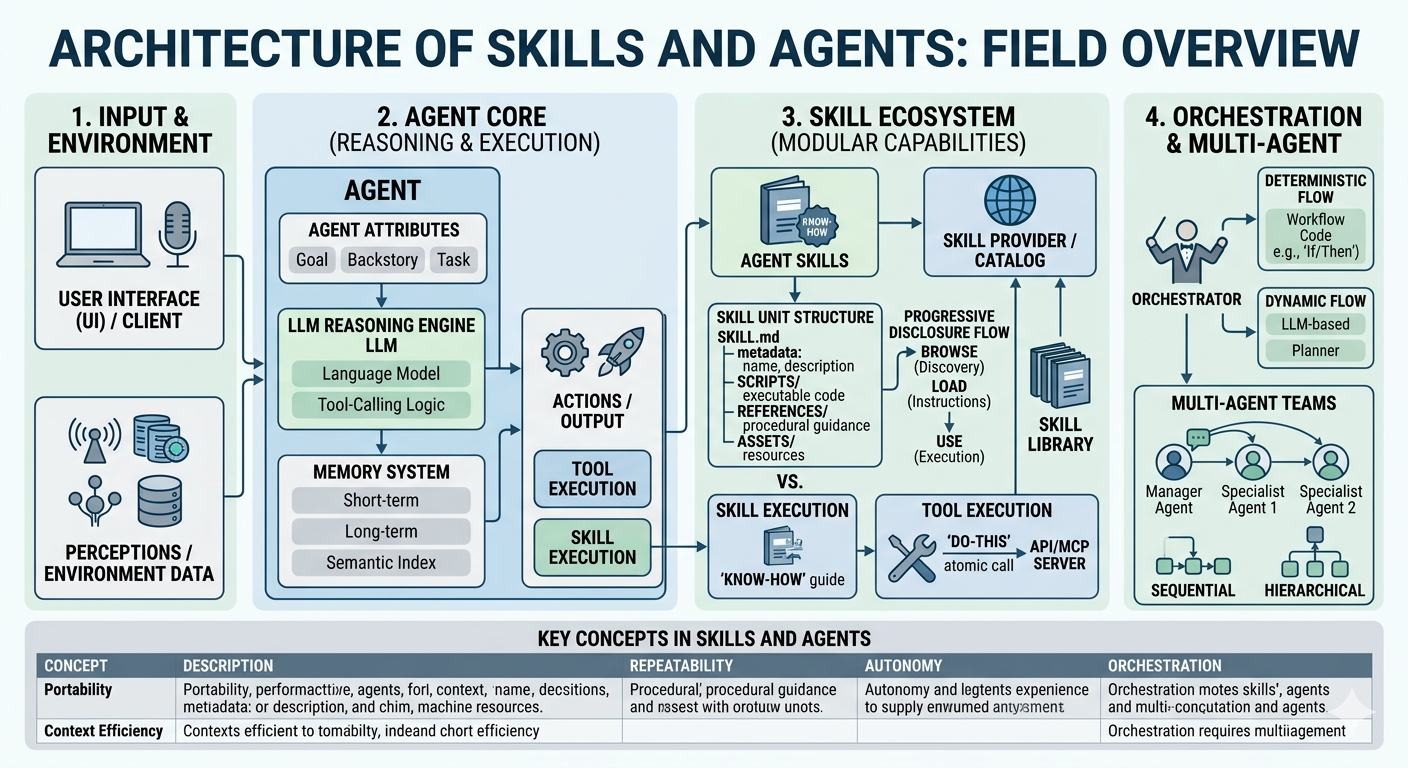
Agent skills in Claude
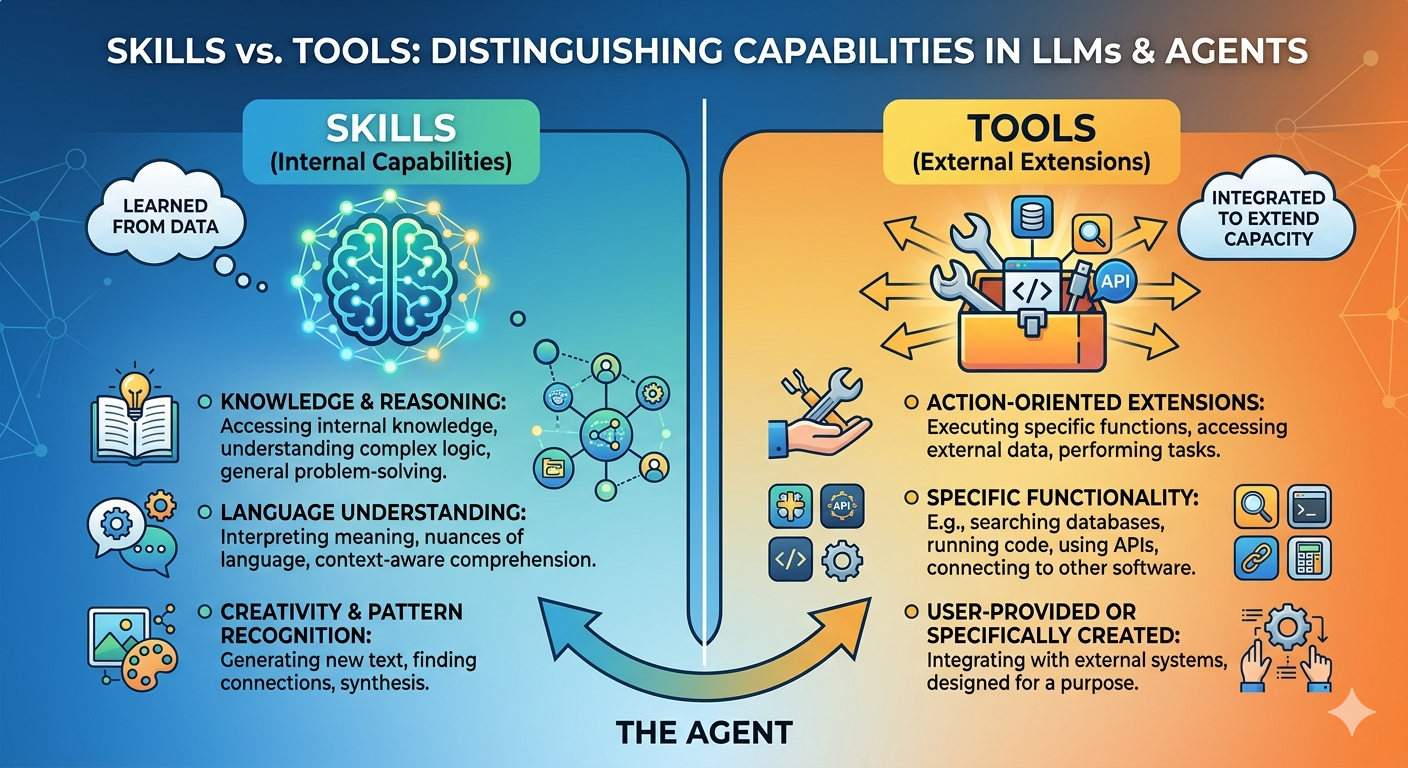
Skills vs. Tools
Think of a skill as the agent’s talent and a tool as its toolbox. A skilled carpenter (the agent) knows how to build a house (skill), but they still need a hammer (tool) to drive the nails. If you give a hammer to someone who doesn’t know how to build, you just end up with a very dented wall.
-
In the world of agentic design, the distinction between skills and tools is essentially the difference between brainpower and equipment. While they often work in tandem, their roles in an agent’s architecture are distinct.
-
The Tools are the knives, ovens, and blenders. They are available for any chef to use for a specific, simple function.
-
The Skills are the recipes and techniques (e.g., “how to sauté” or “how to bake a soufflé”).
-
Having the oven (tool) doesn’t mean you know the 10-step process of timing and temperature required to make the soufflé (skill).
-
Tools often fail because the agent doesn’t know when or how to use them.
-
Skills provide the guardrails and logic to ensure tools are used correctly.
Subagents
Integrations
-
Github
-
Google Drive
-
Slack
Prompts
- Most atomic unit
Context window
- Context window as a public good
Summary of differences between agents, skills, prompts and MCP
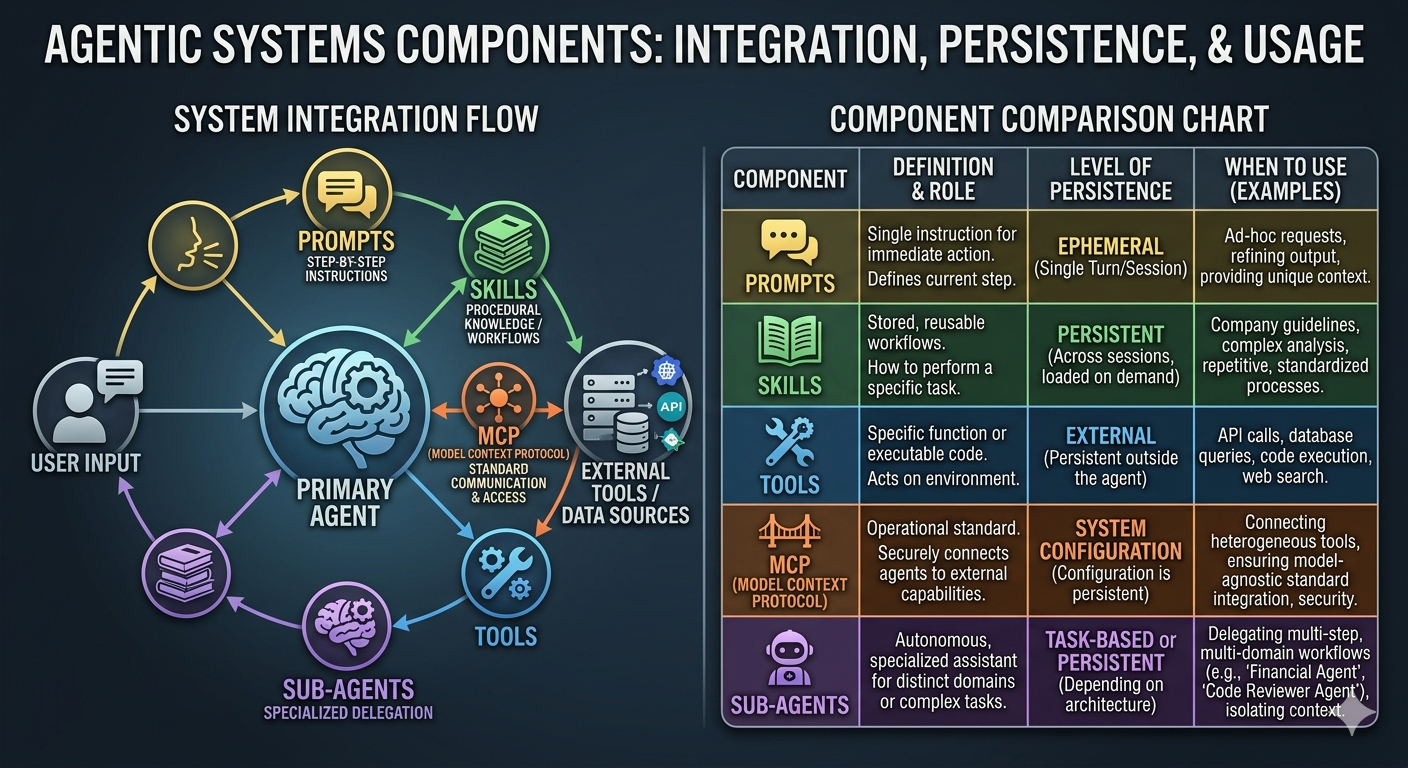
Agentic Components: At a Glance
| Component | Role | Persistence | Best Used For… |
|---|---|---|---|
| Prompts | The immediate “What” and “How.” | Ephemeral (Single turn/session) | Providing context, specific formatting, or one-off logic. |
| Skills | Procedural “How-to” knowledge. | Persistent (Library/Config) | Standardizing repetitive workflows (e.g., “Analyze this dataset”). |
| Tools | Functional “Hands” (APIs, Code). | External (Built into the environment) | Interacting with the real world (e.g., searching the web, sending emails). |
| MCP | The universal “Connector.” | System-Level (Infrastructure) | Connecting an agent to diverse data sources via a standard protocol. |
| Sub-agents | The “Specialists.” | Task-Based (Duration of workflow) | Delegating complex, multi-step tasks to a focused “expert” model. |
🧩🚀 Key Concepts
1. The Hierarchy of Persistence
- Prompts are the most fluid. They live and die within a conversation window. If you want an agent to “remember” a behavior forever without typing it every time, you move that logic into a Skill.
- Tools and MCP connections are foundational. They are configured once at the system level and remain available across all sessions, much like installing software on a computer.
2. The “Hand-off” Workflow
In a sophisticated system, the Primary Agent receives a Prompt, recognizes it doesn’t have the data (via MCP), realizes the task is too complex for one step, and spins up a Sub-agent. That sub-agent uses a specific Skill (procedural knowledge) to execute a Tool (the action).
3. Why MCP Matters Now
Before the Model Context Protocol (MCP), connecting an agent to a new database or service required custom “glue code” for every single tool. MCP acts like a universal USB port—it allows the agent to plug into a standardized server that can provide tools and resources regardless of the specific LLM being used.
4. Skills vs. Tools (The common point of confusion)
- A Tool is the hammer: It’s the actual code that hits an API or executes a Python script.
- A Skill is the carpentry knowledge: It’s the set of instructions that tells the agent when and how to swing that hammer to build a specific thing.
Tip: “Agentic” isn’t just about the model being smart—it’s about the model having the agency to choose between these components to solve a problem.
🎮🛠️ Exercise: Web Search + Summaries + Error Logging Agent
- Read advanced agents
- Objective
- Build a Claude-style agent that performs a web search, generates a short summary, and logs errors for inspection.
- Required toolchain
web_search(query: str) -> list[dict](title/url/snippet)summarize_text(text: str) -> strlog_error(error_details: str) -> str
- Behavior pattern
- Ask clarifying question if input is underspecified.
- Pick a concise search query and call
web_search. - Find the top 3 sources; for each source:
- fetch body text (simulate or use real scraper)
- call
summarize_text
- Compose a final answer with:
- key facts and sources
- “confidence level” marker
- On any exception or missing data, call
log_errorand continue gracefully.
- Prompt scaffold (Claude recommended)
- System: “You are a helpful research assistant. Use tools for facts, summarize clearly, and log any errors for auditing. Keep final answers short.”
- User: “Find the latest techniques for improving retention in adult learning programs. Provide a summary and source links.”
- Evaluation criteria
- correctness of output format
- use of tool calls and summaries
- presence of error log statements for simulated failures
- final answer clarity and citation
- Extra credit
- Add a retry strategy for transient
web_searchfailures (exponential backoff) - Add a optional
verify_with_secondary_source()step before final answer - Add a
safe_query()option for safe search
- Add a retry strategy for transient
Pre-built skills
-
Skill creator
-
PDF and Excel, can also call 🐍 Python programs
-
scriptsfolder -
Example Skills in Claude
-
Use BigQuery MCP server to get data
-
Consistent styling and logos in skills (assets folder)
-
⚠️ Clear and concise, 500 words and use forward slash (
/) -
⚠️
scripts,referencesandassetsfolders
Claude Code
-
Marketplace
-
On Mac OS X and WSL (Windows Shell)
curl -fsSL https://claude.ai/install.sh | bash

cd your-project
claude
Code execution
-
code execution sandbox + filesystem
-
include python code
-
CLAUDE.mdhas coding conventions, patterns and snippets of Python code, etc. -
/skillscommand in Claude code -
Tasks
-
\agentscommand to create agents; can use skills, Python, bash, etc.
Claude Agent SDK
-
create subagents, skills, filesystem handling
-
team sharing: connect to
Notionusing MCP Server -
code
options = ClaudeAgentOptions(
   system_prompt = "You are an agent",
   mcp_servers = {},
   allowed_tools = ["Bash", "WebSearch"],
   model = "sonnet"
)
- Framework to build powerful agentic applications