teaching_web_development
Introduction to GET request method
HTTP GET Requests and Client-Server Architecture
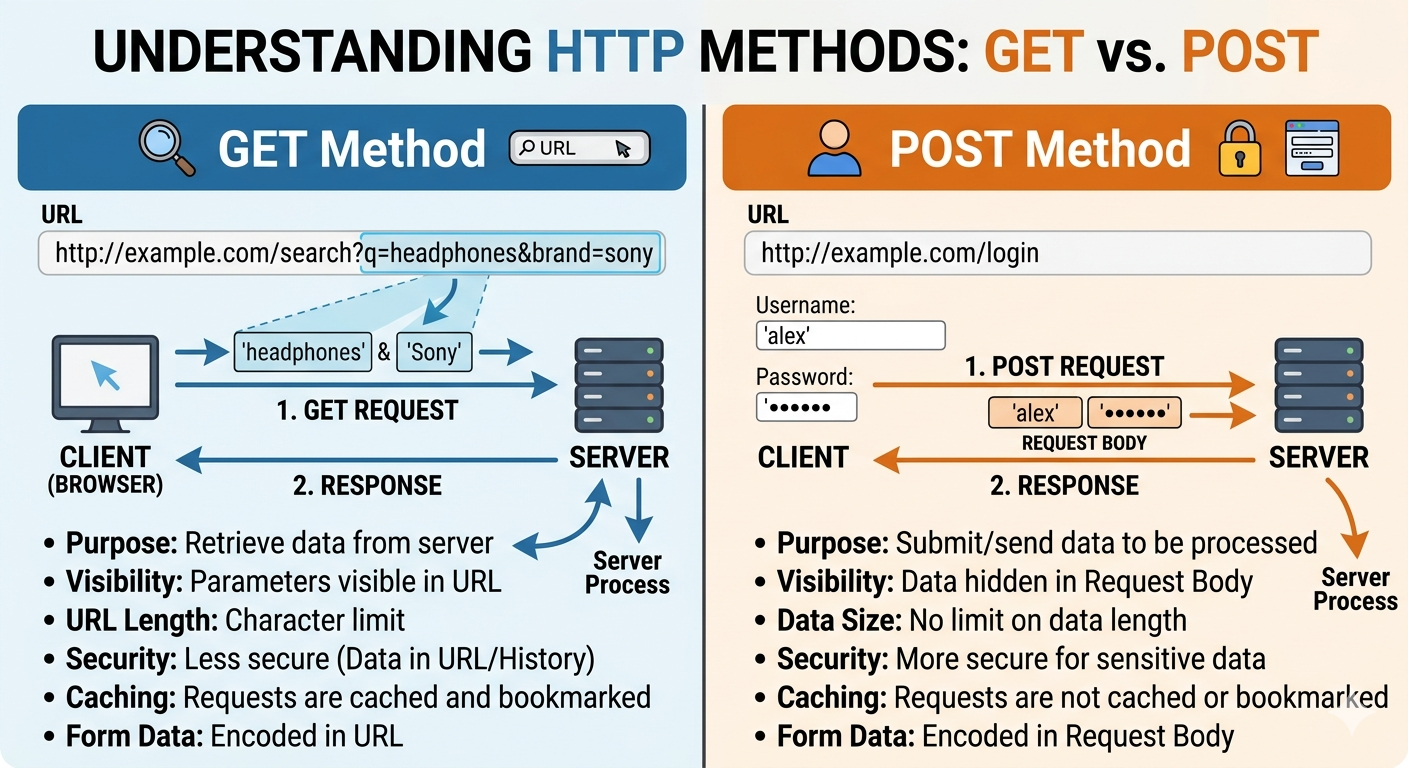
- GET vs. POST
-
GET Method: Used primarily for retrieving data, where information is sent visible to everyone in the URL. This is ideal for things like searches or filtering, which can be easily bookmarked or cached by browsers.
-
POST Method: Used for submitting or uploading data (such as login credentials). The data is sent within the “request body,” making it less visible. This method has no data size limits and is generally considered more secure for sensitive operations.
Client-Server Architecture
-
The web operates on a client-server model where clients (typically web browsers) request resources from servers, which then respond with the requested data.
graph LR
    A[Client<br/>Web Browser] -->|HTTP Request| B[Server<br/>Web Server]
    B -->|HTTP Response| A

    style A fill:#e1f5ff
    style B fill:#fff4e1
Key Components
Client: The client is typically a web browser (Chrome, Firefox, Safari) or any application that initiates HTTP requests. The client is responsible for:
- Sending HTTP requests to servers
- Rendering HTML, CSS, and executing JavaScript
- Displaying content to the user
- Managing cookies and sessions
Server: The server is a computer that hosts web applications and responds to client requests. The server is responsible for:
- Listening for incoming HTTP requests
- Processing requests and executing business logic
- Accessing databases or other resources
- Sending HTTP responses back to clients
HTTP Protocol
HTTP (Hypertext Transfer Protocol) is the foundation of data communication on the web. It’s a request-response protocol that operates on top of TCP/IP.
sequenceDiagram
    participant C as Client
    participant S as Server

    C->>S: 1. TCP Connection Established
    C->>S: 2. HTTP Request
    S->>S: 3. Process Request
    S->>C: 4. HTTP Response
    C->>S: 5. TCP Connection Closed (or kept alive)
GET Requests
GET is one of the most common HTTP methods. It’s used to retrieve data from a server without modifying anything on the server.
Characteristics of GET Requests
- Idempotent: Multiple identical GET requests should have the same effect as a single request
- Cacheable: Responses can be cached by browsers and proxies
- Parameters in URL: Query parameters are visible in the URL
- Bookmarkable: URLs with GET parameters can be saved and shared
- Length Limitations: URLs have maximum length restrictions (typically ~2000 characters)
- No Request Body: Data is sent only via URL parameters
Anatomy of a GET Request
GET /api/users?id=123&name=John HTTP/1.1
Host: www.example.com
User-Agent: Mozilla/5.0
Accept: text/html,application/json
Connection: keep-alive
Components:
- Method: GET
- Path: /api/users
- Query String: ?id=123&name=John
- Protocol Version: HTTP/1.1
- Headers: Additional metadata about the request
GET Request Flow
sequenceDiagram
    participant Browser as Web Browser
    participant DNS as DNS Server
    participant Server as Web Server
    participant DB as Database

    Browser->>Browser: User enters URL or clicks link
    Browser->>DNS: Resolve domain name
    DNS->>Browser: Return IP address
    Browser->>Server: GET /products?category=electronics
    Server->>Server: Parse request
    Server->>DB: Query for electronics products
    DB->>Server: Return product data
    Server->>Server: Format response (HTML/JSON)
    Server->>Browser: HTTP 200 OK + Content
    Browser->>Browser: Render page
Example GET Requests
Simple Page Request:
GET /index.html HTTP/1.1
Host: www.example.com
API Request with Parameters:
GET /api/search?q=javascript&limit=10&page=1 HTTP/1.1
Host: api.example.com
Accept: application/json
Request with Multiple Headers:
GET /profile HTTP/1.1
Host: www.example.com
User-Agent: Mozilla/5.0 (Windows NT 10.0; Win64; x64)
Accept: text/html
Accept-Language: en-US,en;q=0.9
Cookie: session_id=abc123xyz
HTTP Response to GET Request
After processing a GET request, the server sends back a response.
Response Structure
HTTP/1.1 200 OK
Content-Type: text/html; charset=UTF-8
Content-Length: 1234
Date: Mon, 16 Dec 2024 10:00:00 GMT
Server: Apache/2.4.41

<!DOCTYPE html>
<html>
<head>
    <title>Example Page</title>
</head>
<body>
    <h1>Hello, World!</h1>
</body>
</html>
Components:
- Status Line: HTTP/1.1 200 OK
- Headers: Metadata about the response
- Body: The actual content (HTML, JSON, etc.)
Common HTTP Status Codes
| Code | Meaning | Description |
|---|---|---|
| 200 | OK | Request succeeded |
| 301 | Moved Permanently | Resource has a new permanent URL |
| 302 | Found | Temporary redirect |
| 304 | Not Modified | Cached version is still valid |
| 400 | Bad Request | Invalid request syntax |
| 401 | Unauthorized | Authentication required |
| 403 | Forbidden | Server refuses to fulfill request |
| 404 | Not Found | Resource doesn’t exist |
| 500 | Internal Server Error | Server encountered an error |
| 503 | Service Unavailable | Server temporarily unavailable |
Complete GET Request Example
sequenceDiagram
    participant U as User
    participant B as Browser
    participant S as Server

    U->>B: Clicks "Search" button
    B->>B: Constructs URL with query params
    Note over B: www.example.com/search?q=http
    B->>S: GET /search?q=http HTTP/1.1<br/>Host: www.example.com
    S->>S: Process search query
    S->>S: Generate HTML response
    S->>B: HTTP/1.1 200 OK<br/>Content-Type: text/html<br/><br/><html>...</html>
    B->>B: Parse and render HTML
    B->>U: Display search results
When to Use GET Requests
✅ Use GET for:
- Retrieving web pages
- Searching and filtering data
- Fetching user profiles or other resources
- Reading API endpoints
- Any operation that doesn’t change server state
❌ Don’t use GET for:
- Submitting sensitive data (passwords, credit cards)
- Creating, updating, or deleting resources
- Operations with side effects
- Large amounts of data (use POST instead)
GET vs Other HTTP Methods
| Method | Purpose | Has Body | Idempotent | Safe |
|---|---|---|---|---|
| GET | Retrieve data | No | Yes | Yes |
| POST | Create/submit data | Yes | No | No |
| PUT | Update/replace resource | Yes | Yes | No |
| PATCH | Partial update | Yes | No | No |
| DELETE | Remove resource | No | Yes | No |
Safe: The method doesn’t modify server state
Idempotent: Multiple identical requests have the same effect as one
Practical Examples
JavaScript Fetch API (GET)
// Simple GET request
fetch('https://api.example.com/users/123')
    .then(response => response.json())
    .then(data => console.log(data));

// GET with query parameters
const params = new URLSearchParams({
    category: 'electronics',
    limit: 10
});

fetch(`https://api.example.com/products?${params}`)
    .then(response => response.json())
    .then(data => console.log(data));
HTML Forms with GET
<form action="/search" method="GET">
    <input type="text" name="q" placeholder="Search...">
    <input type="number" name="limit" value="10">
    <button type="submit">Search</button>
</form>

<!-- Submitting creates: /search?q=javascript&limit=10 -->
Security Considerations
-
Never send sensitive data in GET: Passwords, credit card numbers, or personal information should never be in URLs as they appear in browser history, server logs, and can be cached
-
URL length limits: Browsers and servers have URL length restrictions, typically around 2000 characters
-
Parameter tampering: Users can easily modify URL parameters, so always validate on the server side
-
Caching: Be aware that GET responses may be cached by browsers, proxies, and CDNs
Things to teach
- Client server architecture
- Clients (browsers) make requests to servers
- Servers respond with resources (HTML, JSON, images, etc.)
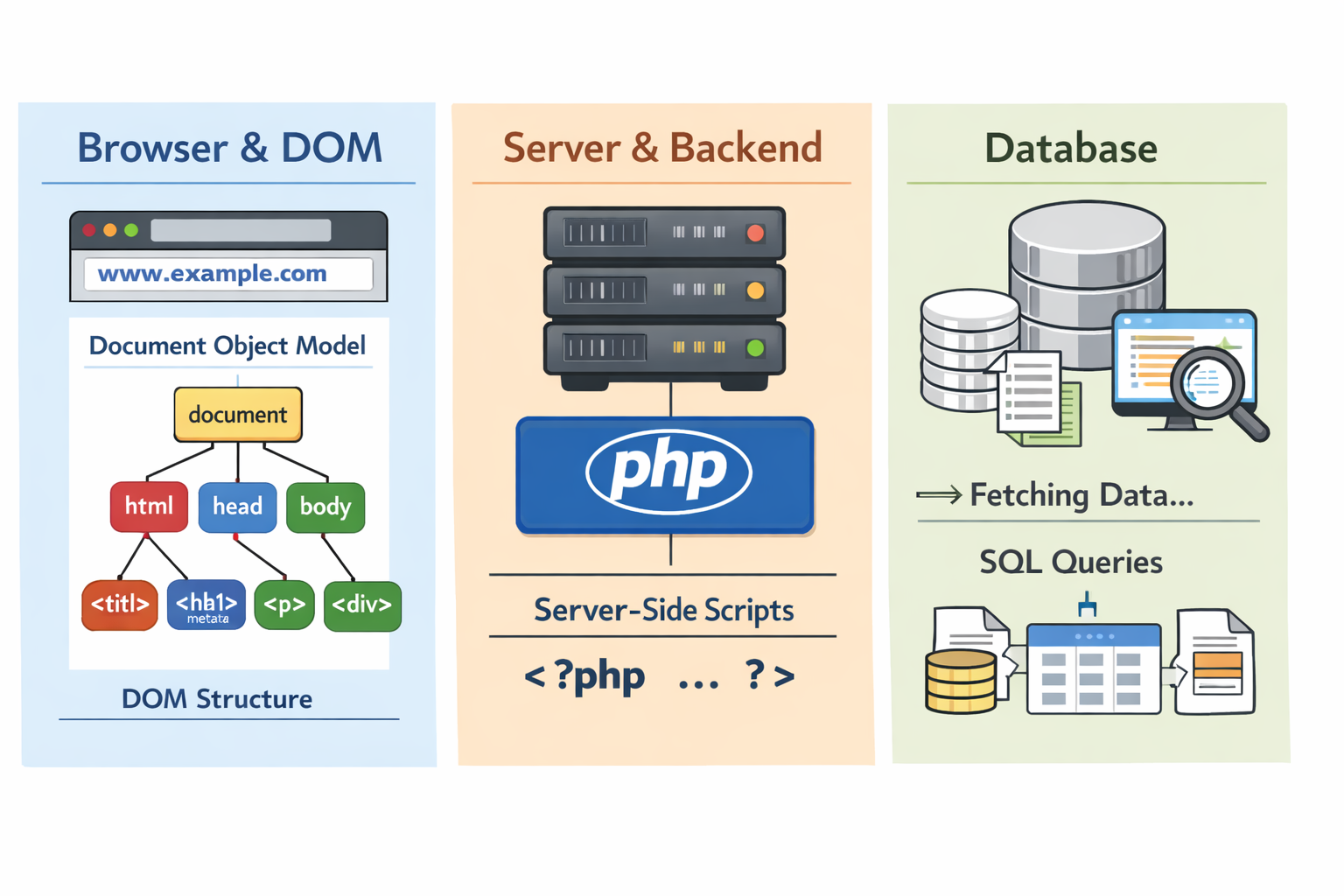
- Database interaction on the server side
-
This is shown in the diagram below
- Command line
- Command line
curlfor making GET requestswgetfor downloading files via GET
- Browser DevTools
- Network tab to inspect GET requests and responses
- Browser developer mode
- Chrome DevTools, Firefox Developer Tools
- Chrome: View -> Developer -> Developer Tools (network tab)
- Firefox: Tools -> Web Developer -> Toggle Tools
Error codes
- 4xx: Client errors (e.g., 404 Not Found, 403 Forbidden)
- 5xx: Server errors (e.g., 500 Internal Server Error, 503 Service Unavailable)
Assignment 1: Exploring GET Requests (15 minutes)
- Use
curlto make a GET request to a public API and analyze the response.
curl -i "https://api.github.com/repos/octocat/Hello-World"
- Examine the response headers and body. Identify the status code, content type, and any relevant data returned.
Assignment 2: Inspecting GET Requests in the Browser (15 minutes)
Acknowledgment: This assignment is adapted from the “Using Python to Access Web Data” course on Coursera by the University of Michigan.
Open the following file in a browser tab with Developer Mode (Developer Tools) enabled so you can inspect the HTTP Response headers. You may need to open the URL in a new tab, enable Developer Mode, then reload the page to capture the headers.
http://data.pr4e.org/intro-short.txt
Notes on caching and response codes: If some headers are missing, your browser may be serving a cached copy. Check the HTTP Response Code shown in the developer console. A 200 status means the document was retrieved normally. A 304 status indicates your browser used a cached copy instead of fetching the file fresh.
How to force a fresh retrieval:
- Clear your browser cache and reload the page, or
- Append a dummy query parameter to the URL, for example:
http://data.pr4e.org/intro-short.txt?x=12345Change the value ofx=and reload until the developer console shows a 200 response.
Summary
GET requests are the backbone of web browsing and APIs. They allow clients to retrieve resources from servers in a standardized, cacheable, and bookmarkable way. Understanding the client-server architecture and how GET requests flow through the system is fundamental to web development.