teaching_llm_agents
MCP
Lecture
Open AI MCP code
Intro
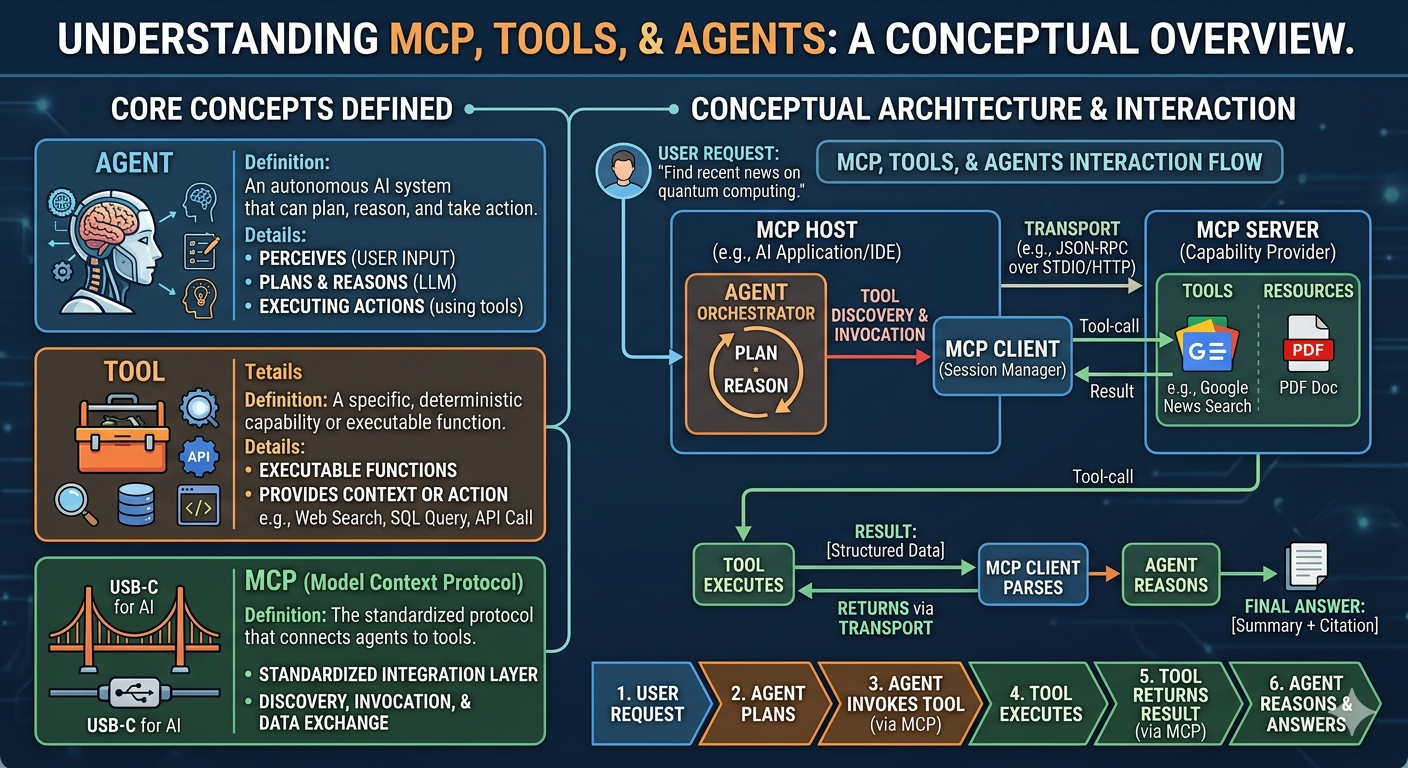
-
MCP standardizes how models connect to tools and data sources
-
can connect to databases, CRM, github, Google Drive, Asana, Slack, …..
-
Concepts 🧩 🚀 Separation of concerns
Client-server architecture
-
similar to GET request
-
resources
@mcp.resource(
    "docs/documents",
    mime_type="application/json"
)
def list_docs():
    # return docs
- prompts
@mcp.prompt(
    name = "format",
    description = "grant rewrite"
)
def format_doc():
    # format
-
prompt templates
-
jinja -
Communication lifecycle of MCP (GET/POST/RESPONSE)
-
MCP Transport (stdio, HTTP)
Building your MCP server
-
FastMCP -
Code from deeplearning.ai course
%% writefile mcp_project/research_server.py
import arxiv
import json
import os
from typing import List
from mcp.server.fastmcp import FastMCP

PAPER_DIR = "papers"

# Initialize FastMCP server
mcp = FastMCP("research")

@mcp.tool()
def search_papers(topic: str, max_results: int = 5) -> List[str]:
    """
    Search for papers on arXiv based on a topic and store their information.

    Args:
        topic: The topic to search for
        max_results: Maximum number of results to retrieve (default: 5)

    Returns:
        List of paper IDs found in the search
    """

    # Use arxiv to find the papers
    client = arxiv.Client()

    # Search for the most relevant articles matching the queried topic
    search = arxiv.Search(
        query = topic,
        max_results = max_results,
        sort_by = arxiv.SortCriterion.Relevance
    )

    papers = client.results(search)

    # Create directory for this topic
    path = os.path.join(PAPER_DIR, topic.lower().replace(" ", "_"))
    os.makedirs(path, exist_ok=True)

    file_path = os.path.join(path, "papers_info.json")

    # Try to load existing papers info
    try:
        with open(file_path, "r") as json_file:
            papers_info = json.load(json_file)
    except (FileNotFoundError, json.JSONDecodeError):
        papers_info = {}

    # Process each paper and add to papers_info
    paper_ids = []
    for paper in papers:
        paper_ids.append(paper.get_short_id())
        paper_info = {
            'title': paper.title,
            'authors': [author.name for author in paper.authors],
            'summary': paper.summary,
            'pdf_url': paper.pdf_url,
            'published': str(paper.published.date())
        }
        papers_info[paper.get_short_id()] = paper_info

    # Save updated papers_info to json file
    with open(file_path, "w") as json_file:
        json.dump(papers_info, json_file, indent=2)

    print(f"Results are saved in: {file_path}")

    return paper_ids

@mcp.tool()
def extract_info(paper_id: str) -> str:
    """
    Search for information about a specific paper across all topic directories.

    Args:
        paper_id: The ID of the paper to look for

    Returns:
        JSON string with paper information if found, error message if not found
    """

    for item in os.listdir(PAPER_DIR):
        item_path = os.path.join(PAPER_DIR, item)
        if os.path.isdir(item_path):
            file_path = os.path.join(item_path, "papers_info.json")
            if os.path.isfile(file_path):
                try:
                    with open(file_path, "r") as json_file:
                        papers_info = json.load(json_file)
                        if paper_id in papers_info:
                            return json.dumps(papers_info[paper_id], indent=2)
                except (FileNotFoundError, json.JSONDecodeError) as e:
                    print(f"Error reading {file_path}: {str(e)}")
                    continue

    return f"There's no saved information related to paper {paper_id}."


if __name__ == "__main__":
    # Initialize and run the server
    mcp.run(transport='stdio')
- Start a new terminal
# start a new terminal
import os
from IPython.display import IFrame

IFrame(f"{os.environ.get('DLAI_LOCAL_URL').format(port=8888)}terminals/1",
       width=1024, height=768)
- Print proxy server address
# Print the inspector proxy address
print("Inspector Proxy Address that you need to specify under configuration in the inspector UI:")
print(os.environ.get('DLAI_LOCAL_URL').format(port=6277)[:-1])
Building your own MCP client
-
use
asyncandawait
import asyncio
import nest_asyncio

nest_aynscio.apply()

# code for chatbot
async def main():
    '''
        Main code for chatbot
    '''
    chatbot = MCP_Chatbot()
    await chatbot.connect_to_server_and_run()


if __name__ == "__main__":
    asyncio.run(main())
Reference servers
-
Filesystem MCP server, github MCP server
-
Use
npxto run server
Adding prompt and resource features
-
⚠️ Resources are read-only data
@mcp.resource
def ret_resource():
- Prompt templates
@mcp.prompt
def ret_prompt():
- ⚠️ Sessions