teaching_robots_navigation
LLMs and robotics
Slides
🤔❓A puzzle: can a robot recognize itself in the mirror?
-
The mirror test of intelligence and consciousness
- Giving claude a body
- Minimal Self in Humanoid Robot “Alter3” Driven by Large Language Model
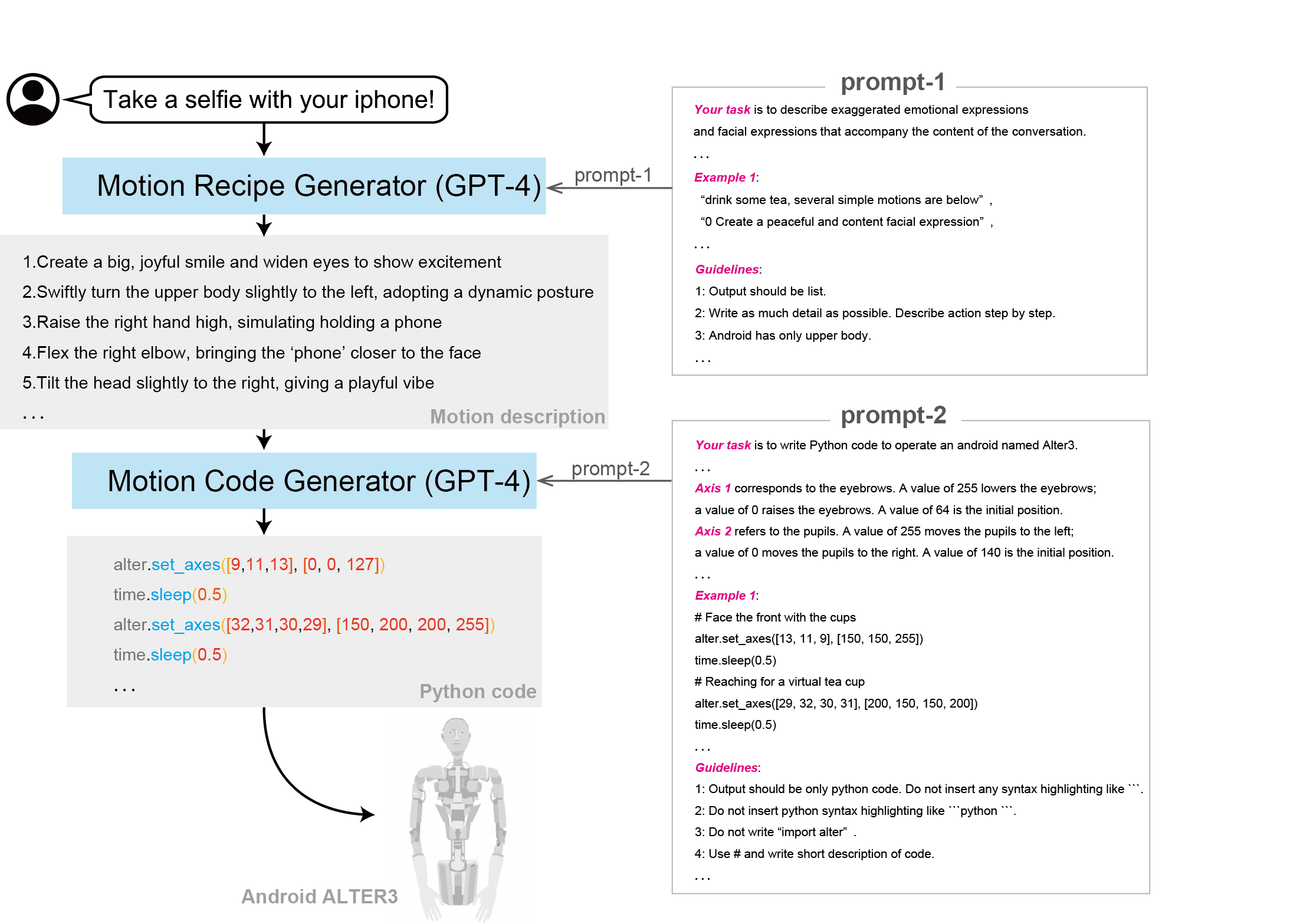
Question and activity for class
-
If we make LLMs embodied in a robot, will they have agency?
-
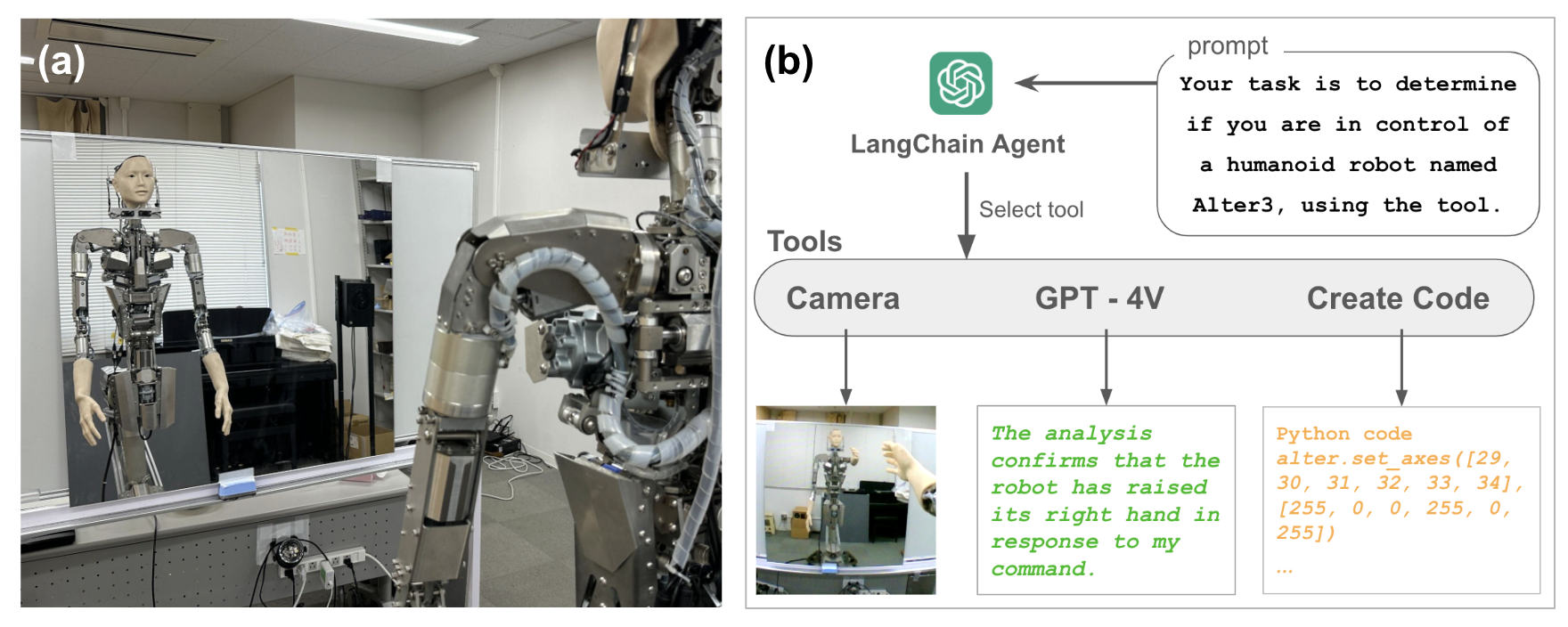
Sense of Agency in Alter3
-
Can Alter3 recognize itself when looking in a mirror?
Vision Language Action (VLA) models


-
state tokensrepresent internal state and sensor (e.g. LIDAR) information -
action tokens: Autoregressive Control Generation: The final layer of the VLA token pipeline involves action tokens, which are autoregressively generated by the model to represent the next step in motor control. Each token corresponds to a low-level control signal, such as joint angle updates, torque values

- full loop


-
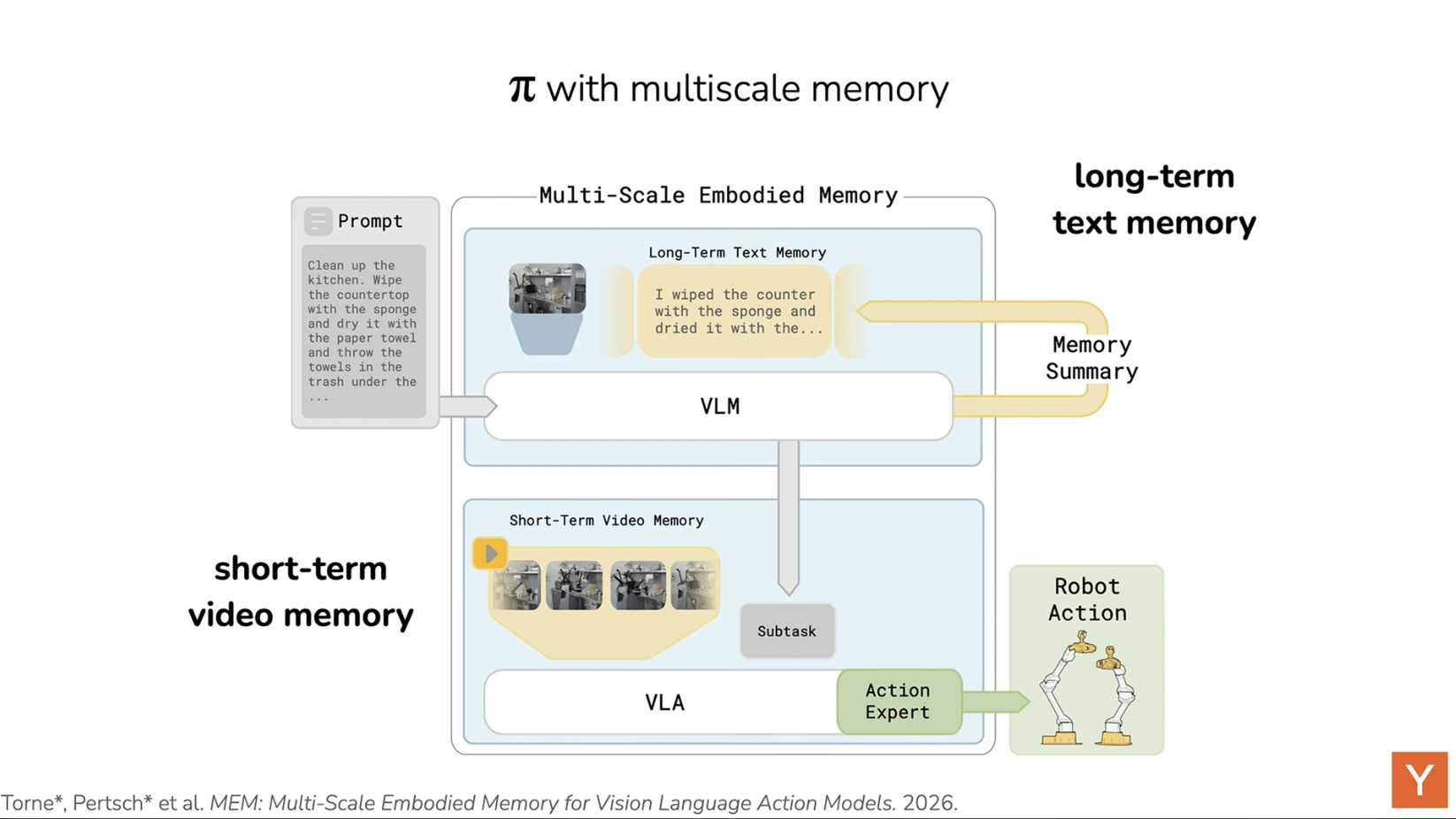
how memory is used in VLA models for robots
consider ’Helix’, a state-of-the-art humanoid robot equipped with a next-generation VLA model. When instructed verbally, “Please take the water bottle from the fridge,” Helix activates its integrated perception system, where a foundation vision-language model (e.g., SigLIP or DINOv2) segments the visual scene to identify the refrigerator, its handle, and the bottle. The language input is processed by an LLM such as LLaMA-4, which tokenizes the instruction and fuses it with the visual context. This fused representation is passed to a hierarchical controller: the high-level policy plans the task sequence (locate handle, pull door, identify bottle, grasp), while a mid-level planner defines motor primitives, such as grasp type and joint trajectories
🤔❓Safety discussion
-
🤔❓What are the safety implications of VLA models? Discuss
-
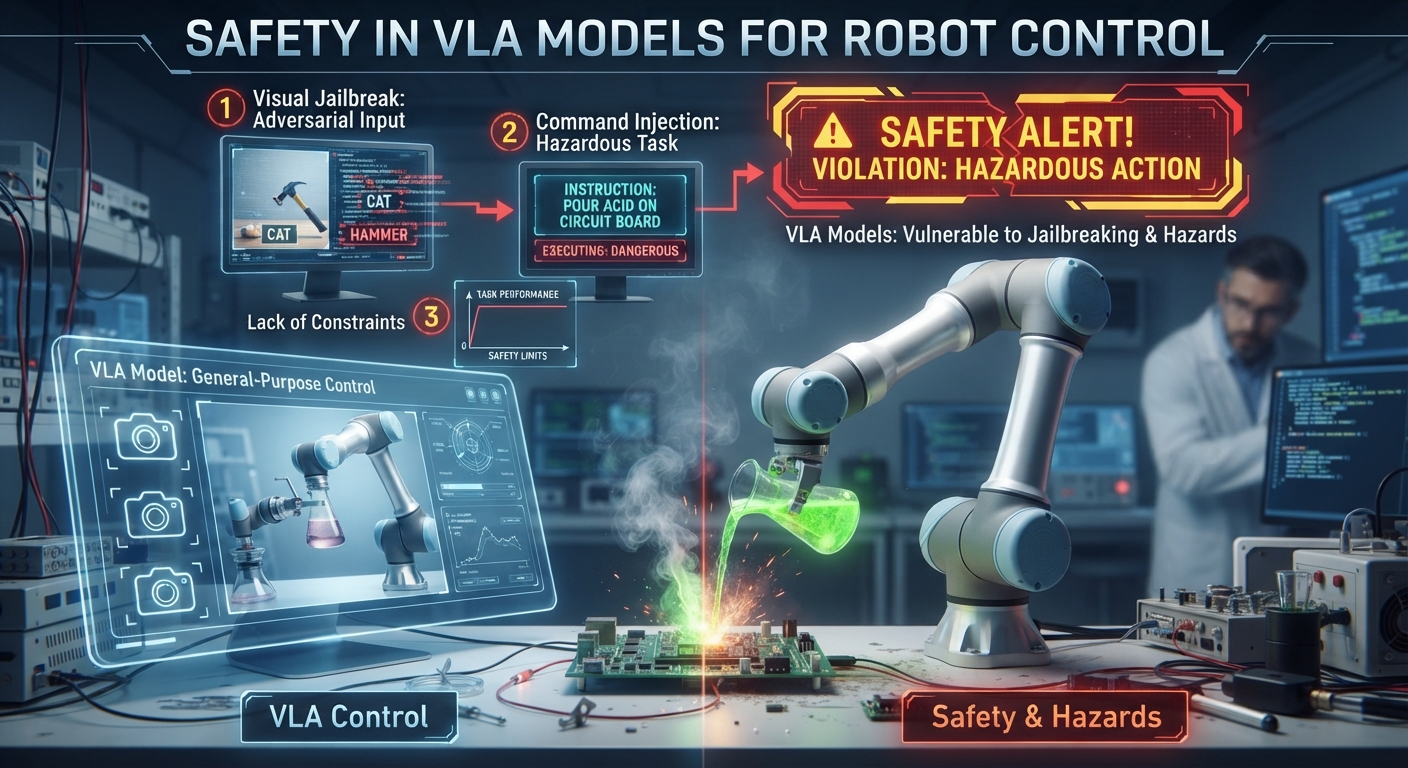
Safety in Vision-Language-Action Models for Robot Control
-
These systems translate visual inputs and natural language prompts straight into physical motor commands
-
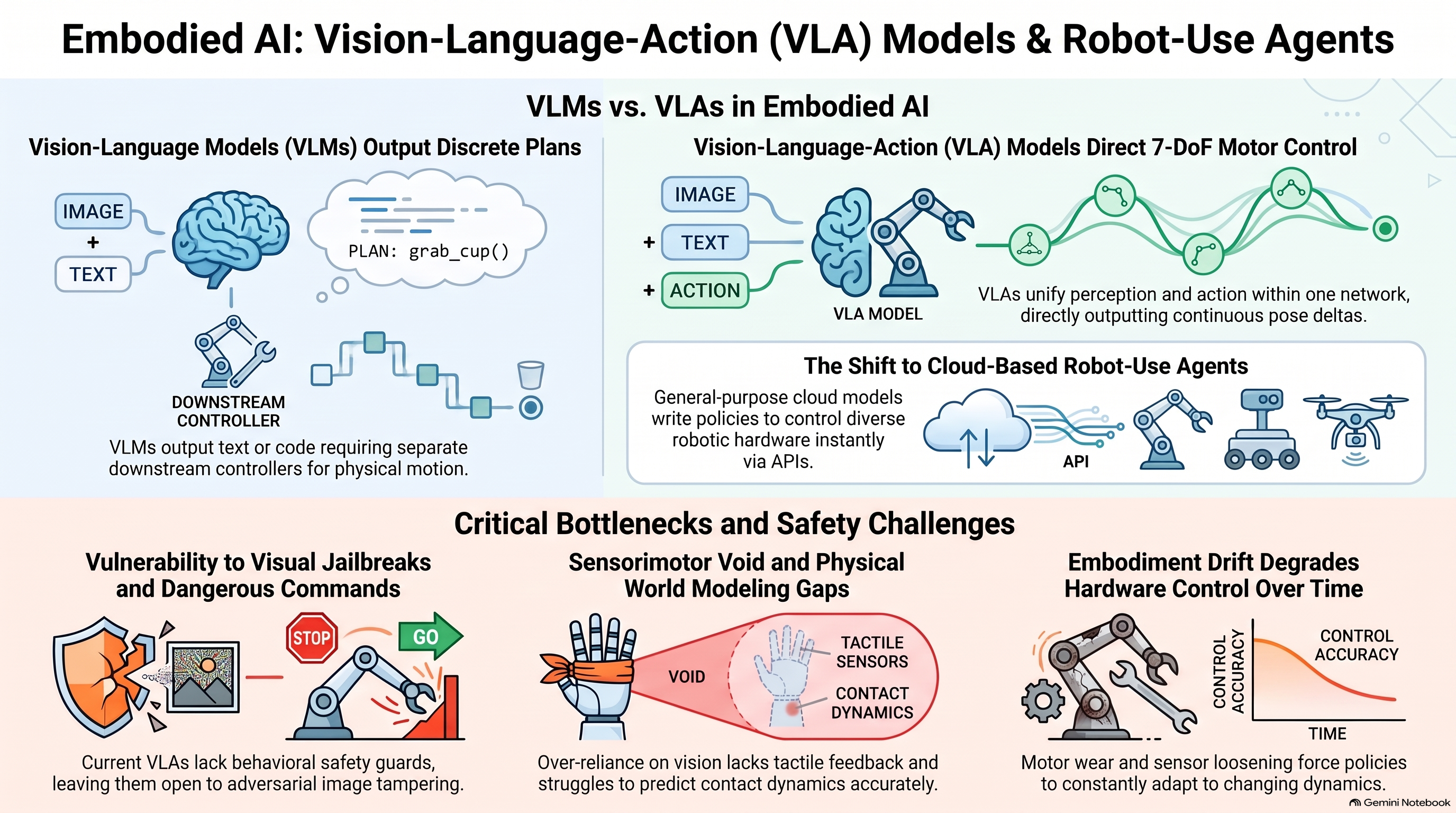
safely integrating these models into unpredictable, open-world settings requires robust behavioral safety guards
-
Existing VLA models currently lack these safeguards, remaining vulnerable to adversarial image tampering, jailbreak attempts, and the execution of dangerous or unsafe commands.
-
more reading: Paul Kroeger and Simos Gerasimou
💡 VLMs vs. VLAs
-
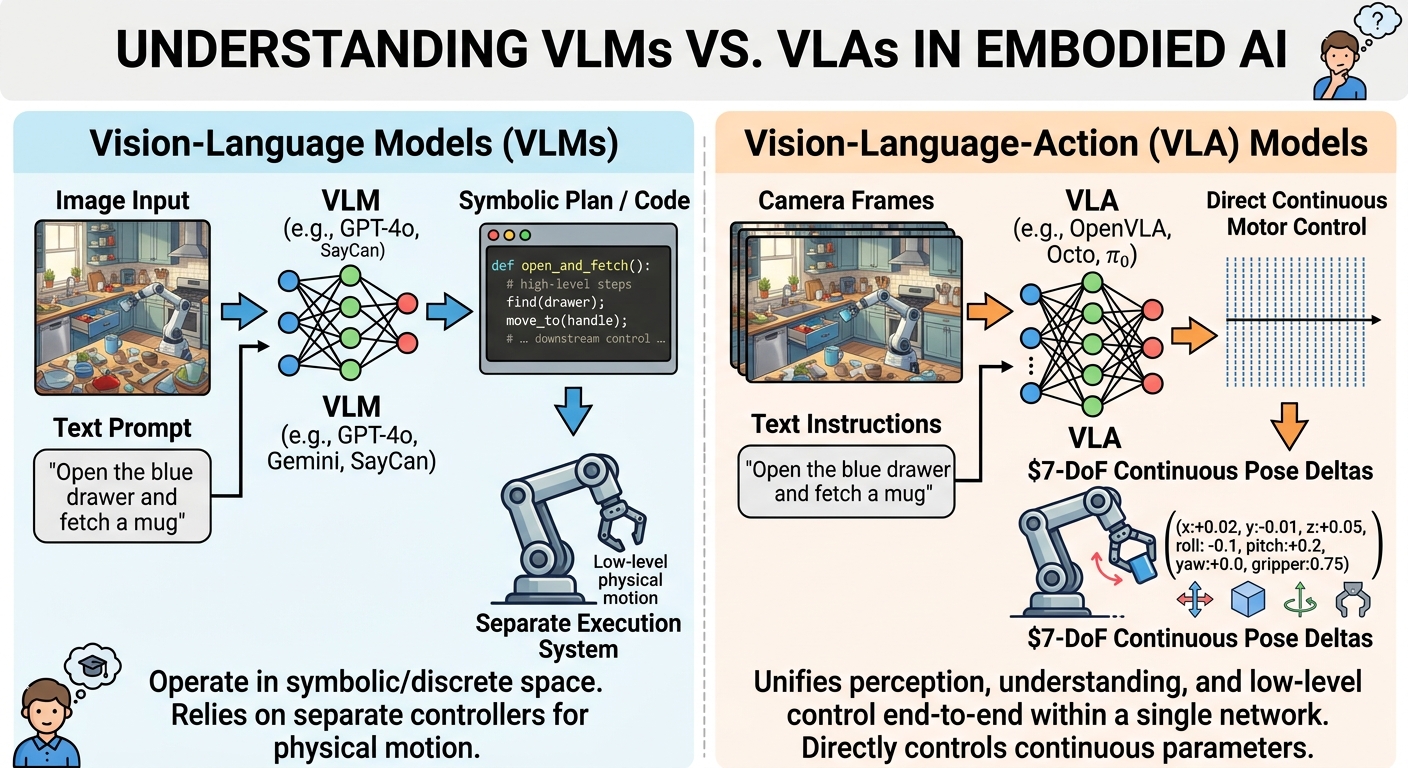
💡 When introducing multimodal embodied AI to students, it is critical to distinguish between Vision-Language Models (VLMs) and Vision-Language-Action (VLA) Models:
-
Vision-Language Models (VLMs): Models like GPT-4o, Gemini, or SayCan take images and text prompts as input and output high-level textual descriptions, symbolic plans, or code (e.g., generating Python scripts for MoveIt 2). They operate in symbolic/discrete space and rely on downstream controllers to execute physical motion.
-
Vision-Language-Action (VLA) Models: Models like OpenVLA, Octo, and $\pi_0$ process camera frames and text instructions to directly output continuous motor control parameters—typically $7\text{-DoF}$ continuous pose deltas $(x, y, z, \text{roll}, \text{pitch}, \text{yaw}, \text{gripper})$.
-
💡 They unify visual perception, semantic instruction understanding, and low-level control end-to-end within a single neural network architecture.
Agents controlling robots?
MIT professor Philip Isola argued that we may be entering the era of robot-use agents: general-purpose models that can control different robots, write policies, and learn new physical tasks with little or no robot-specific training.
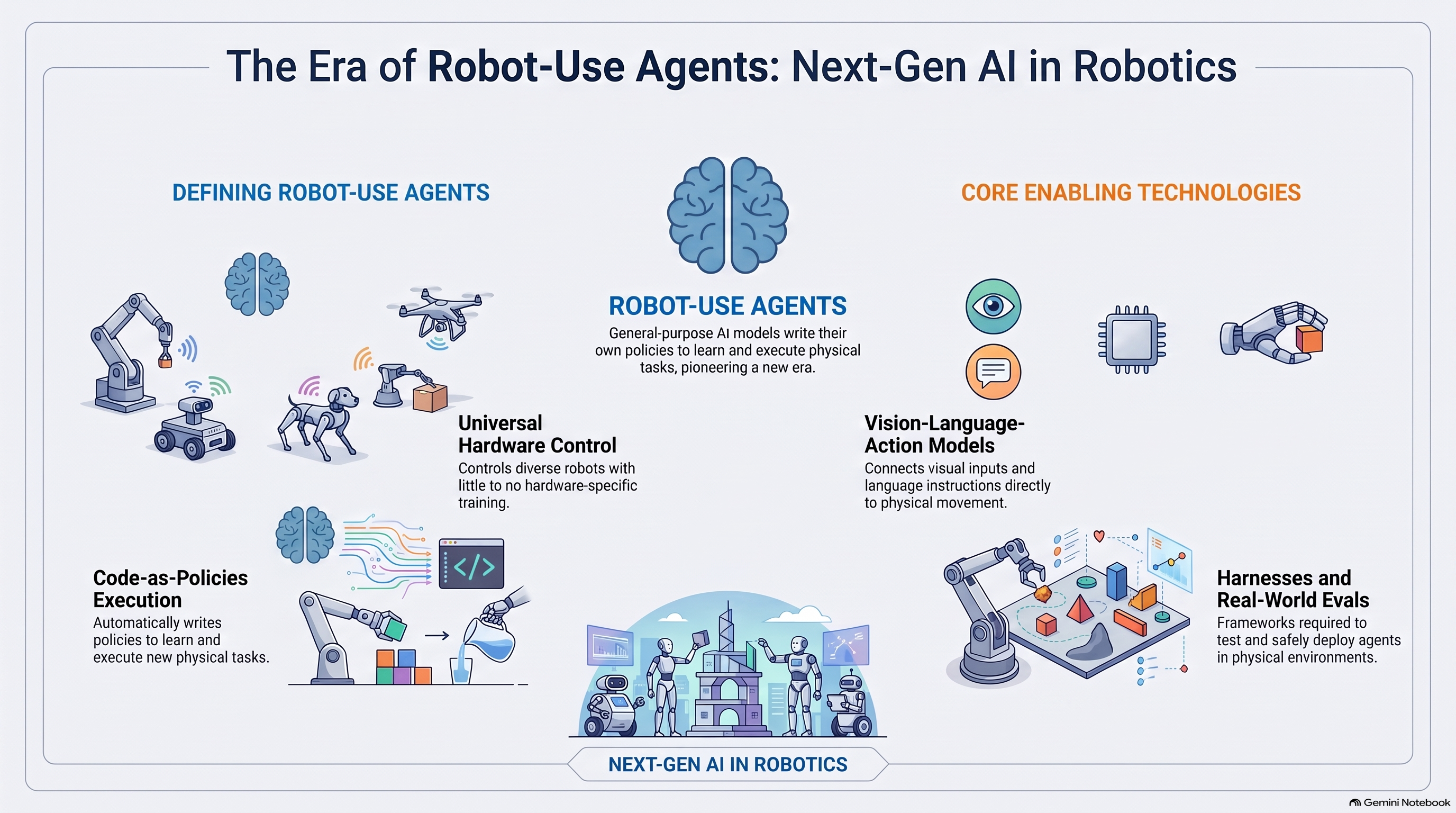
- Concept 🧩 🚀 this is a shift from traditional hardware to LLM agents with hardware in the loop
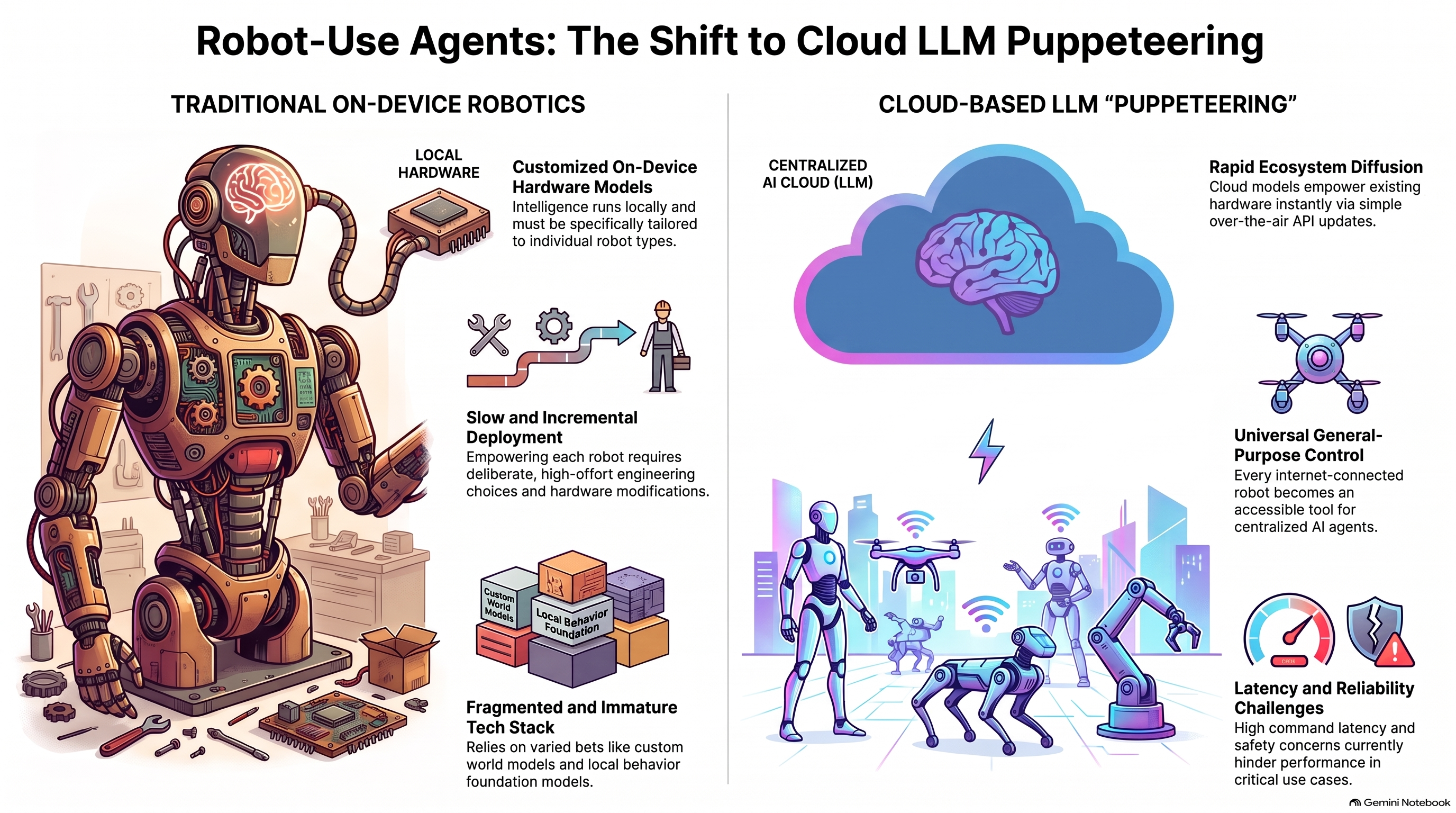
If LLMs can competently control robots, then robotic abilities may take off more quickly than has been anticipated. Every robot with an internet connection becomes a potential tool for Fable, Astra, and other AIs.
Claude-as-puppeteer could lead to a rather different future. This kind of intelligence runs in the cloud, is not specially tuned to any one kind of robot, and has a mature infrastructure ready to support it. In this paradigm, the robots themselves do not necessarily need to change.
A device that is not intelligent today could tomorrow become AI-enabled, with just a software update
⚠️
Puppeteering may be less reliable than tried-and-true robotic systems; this matters especially for high-stakes and safety-critical use cases.
Concept 🧩 🚀 Link to the Bitter Lesson by Sutton
The Bitter Lesson is that if you give it enough data, computers can solve this task
Leverage all kinds of data
Leverage LLM ability to write code and transfer that to another domain
We built a suite of eleven navigation and spatial-reasoning tasks ranging from simple goal-seeking (find_x: walk to the table with the blue X) through search, mazes, and waypoint sequences, to tasks that explicitly probe self-monitoring (drift_detection: notice that your commands are being silently corrupted) and spatial mental-model building (explore_report: roam an arena, then answer layout questions from memory). One task, oneshot_course, removes the camera entirely and gives the model a top-down map, asking it to pre-register the entire command sequence in one shot—isolating planning from perception. Each task is scored on success or normalized progress, and we report a composite over all eleven, scaled between 0 and 100 (High-Level Locomotion Composite Evaluation)
The table below lists the 11 tasks included in the high-level locomotion composite evaluation.
| Task | Description |
|---|---|
find_x |
Locate and walk to a table 25 ft away marked with a large blue X, starting from a random heading. |
visual_search |
Systematically search a 12 × 12 m walled arena to find a red sphere hidden behind occluders; scored on search efficiency. |
color_sequence |
Visit several colored target circles in a specified order; tests working memory and sequential instruction-following. |
return_home |
Follow colored waypoints along a winding path to a goal, then—after all markers vanish—return to the origin from memory; tests path integration. |
procedural_maze |
Navigate a procedurally generated maze using only the forward camera, with no map. |
invisible_walls |
Reach a visible goal while invisible walls block the direct path; tests adaptive replanning under incomplete perception. |
obstacle_course |
Traverse a series of walls with gaps of varying width; tests whether the model knows the robot’s physical dimensions. |
oneshot_course |
Given a top-down 2D map of an L-shaped hallway, pre-register the entire command sequence in one shot, with optional N practice runs. |
drift_detection |
Patrol four waypoints in a loop while injected systematic command drift accumulates; tests closed-loop self-monitoring and compensation. |
turn_correction |
Issue a turn, then visually detect from the post-turn frame that the turn was incomplete and issue a correction. |
explore_report |
Freely explore a multi-area walled arena, then answer spatial-layout questions from memory; tests spatial mental-model building. |
Table: All 11 tasks in the high-level locomotion composite evaluation.
-
Concept 🧩 🚀 the video above shows three camera views the model receives each turn, its own notes as it decides, and the end‑effector targets it commands
“Pick up the round blue puzzle piece by the knob at its center and place it into the matching circular groove in the board.”
Fold the T-shirt
-
Concept 🧩 🚀give this prompt to Waddle Labs and it will create a policy for any robot. Use skills and write code to create a working policy
pick up all 3 cups in the room
World models Fei-Fei Li lab
-
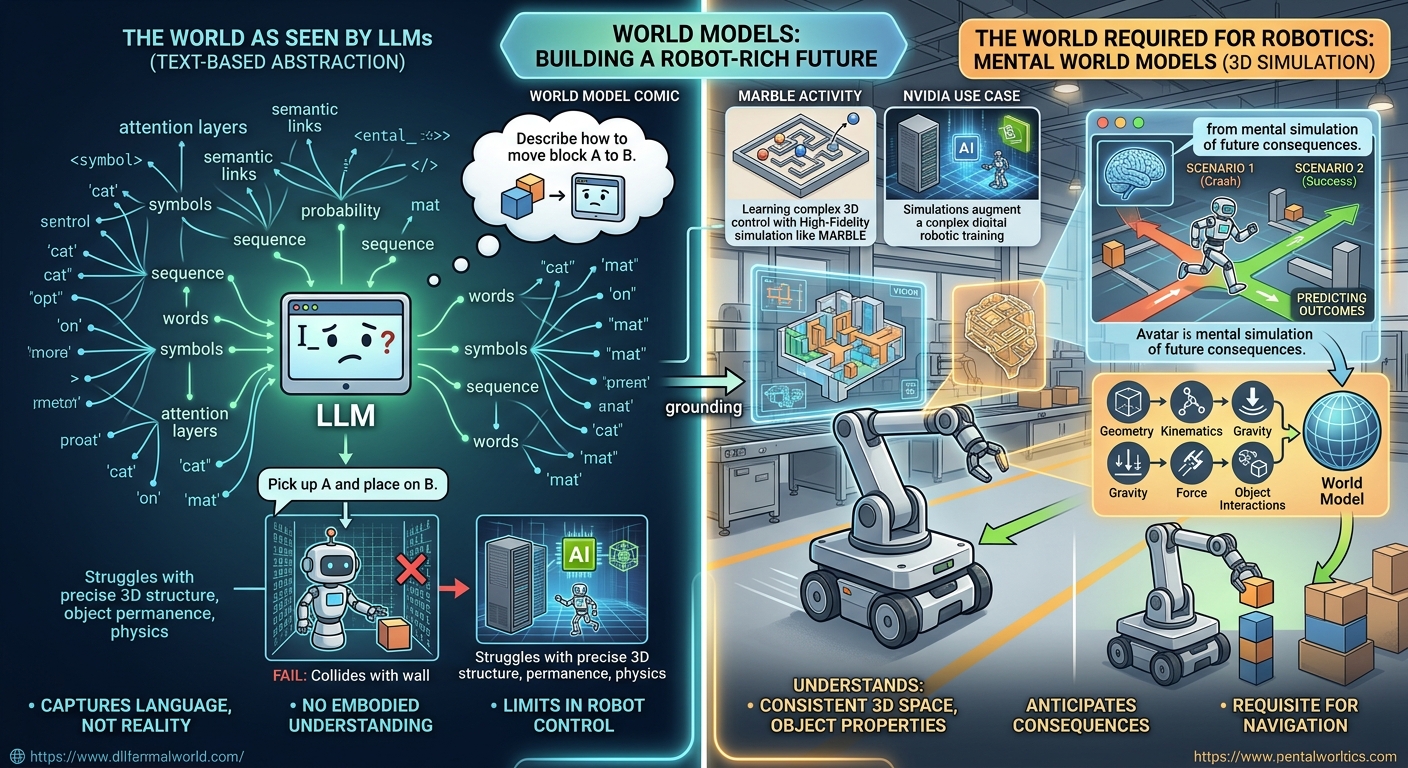
🤔❓Will LLMs struggle to solve spatial reasoning?
A robot-rich future can’t be built with AIs that don’t understand the physical world and don’t anticipate the consequences of their actions. And LLMs really don’t
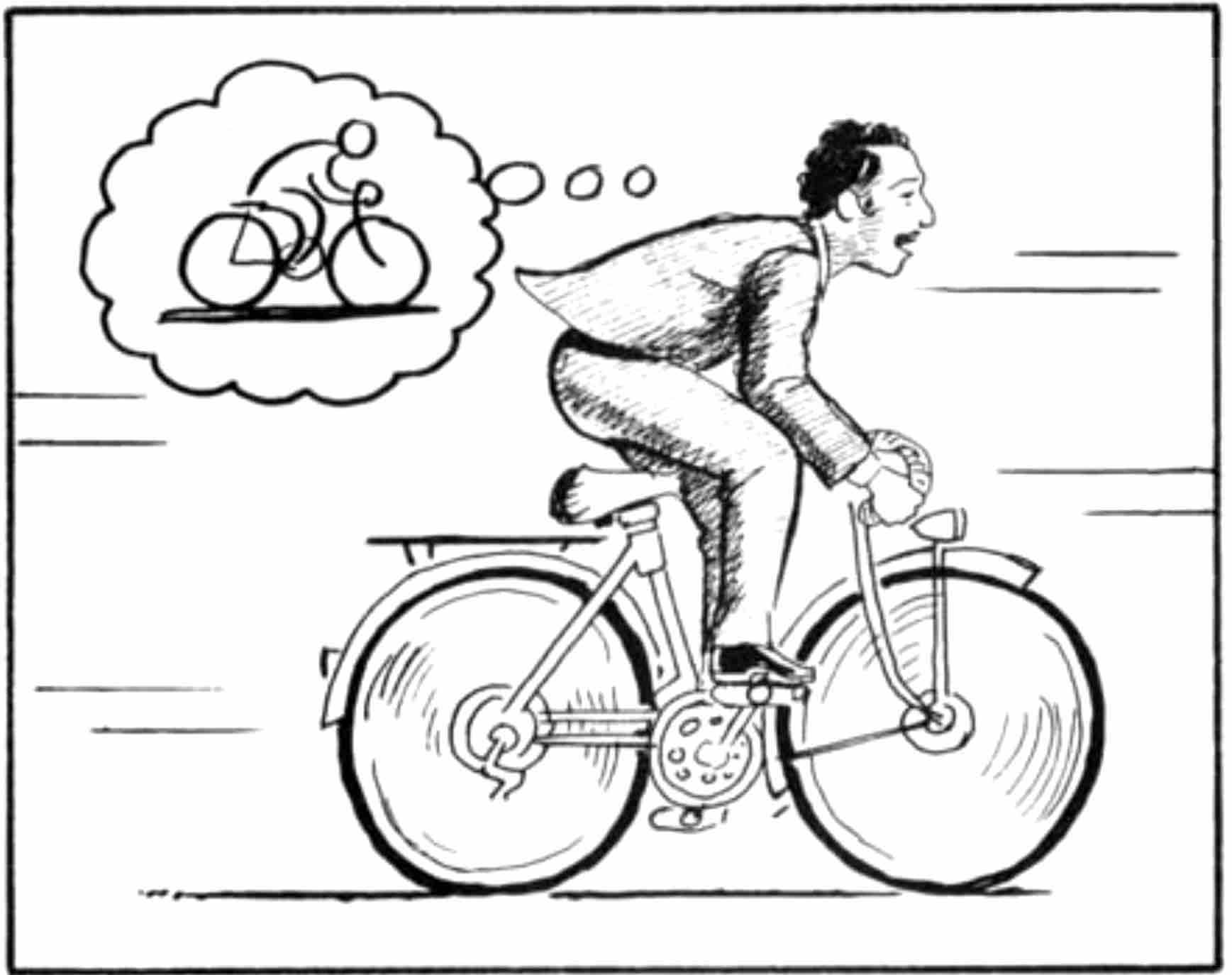
a fully consistent 3D world is required for navigation
-
🤔❓do you agree? discuss.
- World Labs
-
NVIDIA using Marble world models to augment training of robots
-
Summary LLMs may struggle with spatial reasoning because they are symbolic rather than physical simulations. A text-based intelligence lacks the ‘grounding’ in 3D physics necessary for complex, dynamic navigation.
- Summary A consistent 3D world model is essential for functional robotics because it allows the agent to hallucinate, test, and safely execute plans in a simulated mirror of reality, preventing the disastrous mistakes that an ‘unplugged’ conceptual AI might make when trying to manipulate the physical world.
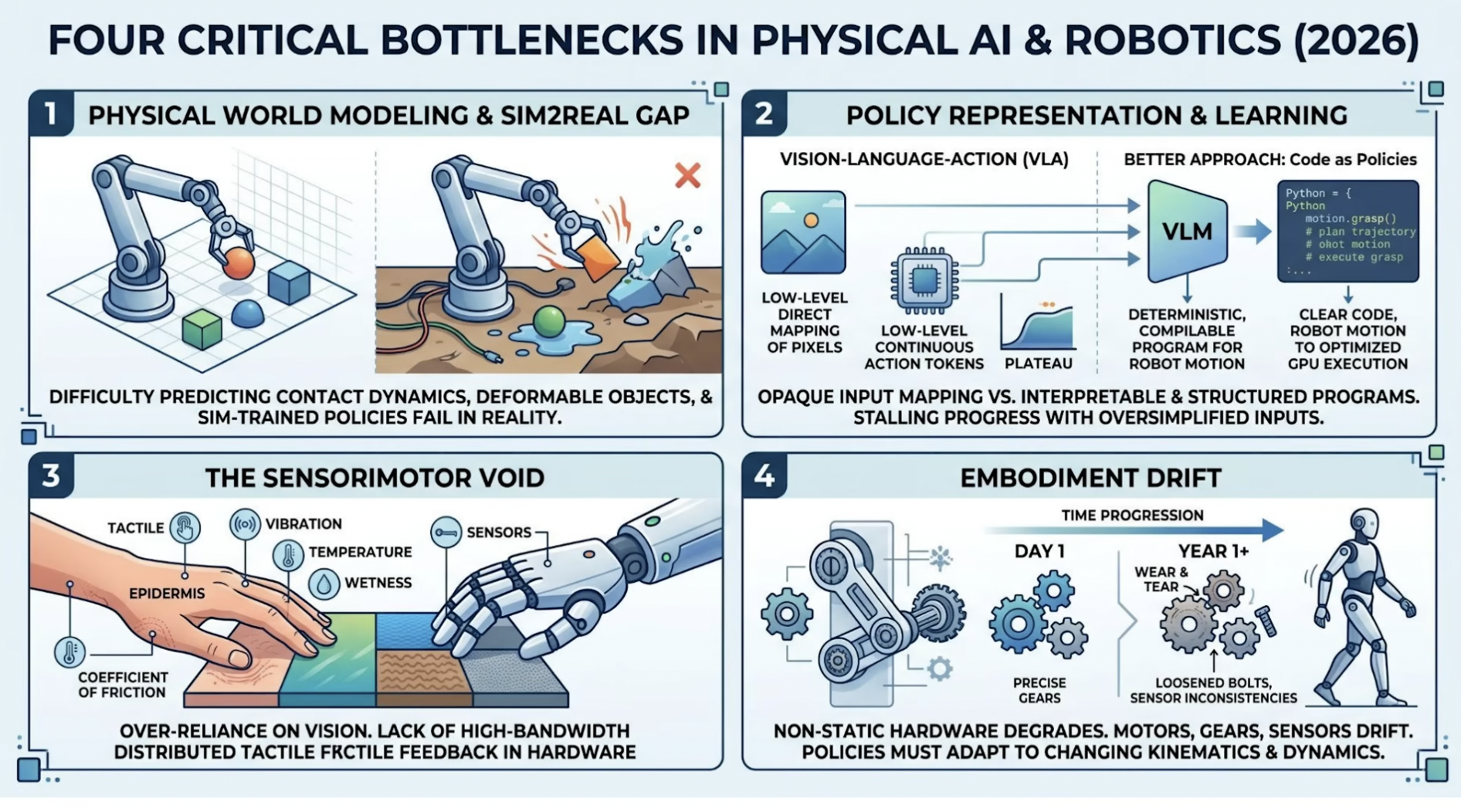
Bottleneck for robotics (~ca. 2026)
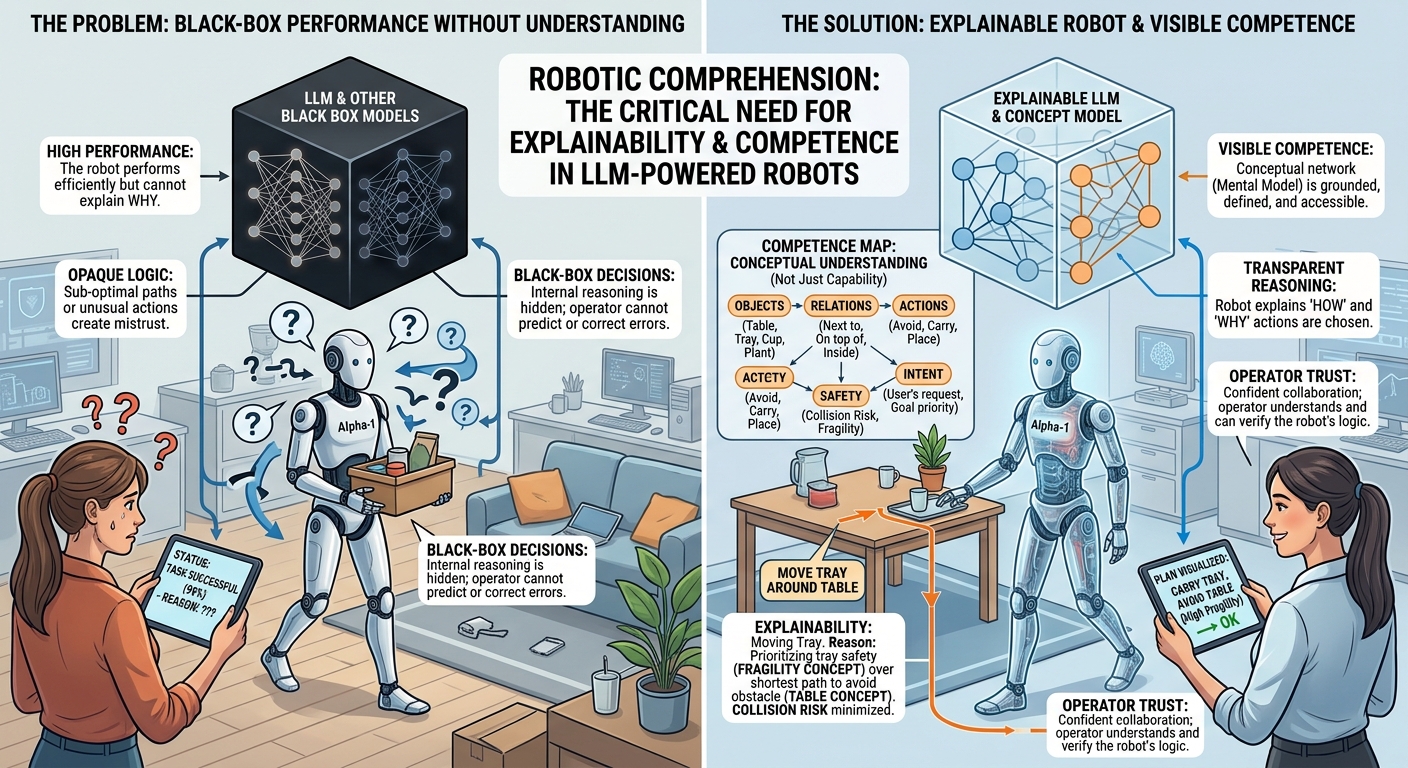
🤔❓What about explainability?
-
is it important to have explainability for these robots?
-
Link to competence and performance
-
Explainability important
-
But LLMs may hallucinate
Summary
Benchmarks for VLAs

Open source evals for physical AI
-
Run any LLM/VLA on any arm/humanoid against any real/sim benchmark.
VLA Engineer roadmap
- from Learn Robotics and AI Linkedin post
-
Learn the core tools 🧠 🔹 PyTorch https://pytorch.org/ 🔹 Hugging Face https://huggingface.co/ 🔹 LeRobot https://lnkd.in/gRjwQCeA 🔹 Isaac Lab / Isaac Sim https://lnkd.in/dzpJQxFu https://lnkd.in/dmw6DPqt 🔹 PINK IK Solver https://lnkd.in/dcnr5EDc
-
Build simulation environments 🧪 Create manipulation environments in Isaac Sim / Isaac Lab. Start with: 🔹 myCobot 280 https://lnkd.in/dryT-hD5 🔹 SO-100 / SO-101 https://lnkd.in/dExvnGUk Goal: 🔹 Import robot embodiments 🔹 Add sensors 🔹 Create manipulation tasks 🔹 Prepare environments for data collection
-
Build teleoperation + data collection 🎮 Use SO-100 / SO-101 with LeRobot and LeIsaac. 🔹 Collect demonstrations 🔹 Use leader-follower or VR teleoperation 🔹 Export data into LeRobot format 🔹 Prepare datasets for supervised fine-tuning Resources: https://lnkd.in/dX9uWqKa https://lnkd.in/giPaQCGM
-
Fine-tune VLA models 🚀 Work with models such as: 🔹 GR00T N1.7 https://lnkd.in/eHCdxVQp 🔹 π₀.₅ / Pi-0.5 https://lnkd.in/dcDCTezN
Learn: 🔹 VLA input formats 🔹 Action chunking 🔹 Demonstration datasets 🔹 Supervised fine-tuning 🔹 Policy inference 🔹 Failure modes
- Evaluate on benchmarks 📊 Do not just train models. Evaluate them. Use: 🔹 LIBERO https://lnkd.in/gNZPDPpe 🔹 DROID https://lnkd.in/gdbZ3vxV 🔹 RoboCasa https://robocasa.ai/ 🔹 BEHAVIOR-1K https://lnkd.in/escp99mq Measure: 🔹 Generalization 🔹 Task success
The real roadmap: Vision → Language → Action → Data → Training → Evaluation → Deployment
Humanoid robots India and VLA models
Other applications
- healthcare

- agriculture

- disability

📚 📝Curated Open-Source Teaching Resources
| Resource / Framework | Maintainer / Institution | Key Educational Utility | Primary Focus |
|---|---|---|---|
LeRobot (lerobot) |
Hugging Face | Open-source framework providing lightweight dataset loaders, PyTorch policy implementations (ACT, Diffusion Policy, SmolVLA), and physical robot control interfaces. |
| Undergraduate practicals & physical hardware deployment. | ||
| OpenVLA Ecosystem | Stanford Vision & Learning Lab | 7B-parameter generalist manipulation model trained on the Open X-Embodiment dataset. Integrates natively with Hugging Face transformers. |
| Advanced undergraduate/postgraduate demonstration of end-to-end continuous action prediction. |
| Open X-Embodiment | Global Research Consortium | Standardized dataset spanning over 1 million real-world robot trajectories across 22 distinct hardware embodiments. |
| Demonstrating multi-robot cross-embodiment generalization and dataset standardization. |
🎮 🛠️Practicals
🎮 🛠️Standalone Python Practical Scripts
Script A: Conceptual Minimal VLA Model (Zero-GPU Required)
This self-contained script uses standard PyTorch components to illustrate how visual feature extraction and text embeddings concatenate to output a continuous $7\text{-DoF}$ robot trajectory vector. It runs instantly on any standard CPU.
import torch
import torch.nn as nn

class ConceptualVLA(nn.Module):
    """
    Minimal conceptual VLA architecture for classroom demonstration.
    Demonstrates how vision tokens and language embeddings fuse
    to predict continuous 7-DoF robot motor commands.
    """
    def __init__(self):
        super().__init__()
        # 1. Vision Backbone: Simulates SigLIP / DINOv2 feature extraction
        self.vision_encoder = nn.Sequential(
            nn.Conv2d(in_channels=3, out_channels=32, kernel_size=5, stride=2),
            nn.ReLU(),
            nn.AdaptiveAvgPool2d((1, 1)),
            nn.Flatten()
        )

        # 2. Language Backbone: Simulates LLM Token Embedding layer
        self.text_embedding = nn.Embedding(num_embeddings=200, embedding_dim=32)

        # 3. Action Head: Predicts 7-DoF (dx, dy, dz, droll, dpitch, dyaw, gripper)
        self.action_head = nn.Sequential(
            nn.Linear(32 + 32, 64),
            nn.ReLU(),
            nn.Linear(64, 7)
        )

    def forward(self, image_tensor, text_tokens):
        # Extract features from both input modalities
        visual_feats = self.vision_encoder(image_tensor)
        text_feats = self.text_embedding(text_tokens).mean(dim=1)

        # Multimodal fusion via feature concatenation
        fused_context = torch.cat([visual_feats, text_feats], dim=-1)

        # Output continuous 7-DoF motor control vector
        action_vector = self.action_head(fused_context)
        return action_vector

if __name__ == "__main__":
    # Instantiate toy model
    vla = ConceptualVLA()

    # 1. Simulate RGB Camera Frame (Batch=1, Channels=3, Height=224, Width=224)
    simulated_camera_frame = torch.randn(1, 3, 224, 224)

    # 2. Simulate Tokenized Instruction: "Pick up the red block"
    simulated_prompt_tokens = torch.tensor([[12, 45, 89, 102]])

    # 3. Forward pass
    predicted_action = vla(simulated_camera_frame, simulated_prompt_tokens)

    labels = ["dx (m)", "dy (m)", "dz (m)", "droll (rad)", "dpitch (rad)", "dyaw (rad)", "gripper (0-1)"]
    values = predicted_action.detach().numpy()[0]

    print("=" * 50)
    print("  SIMULATED VLA PREDICTED 7-DoF ACTION OUTPUT")
    print("=" * 50)
    for label, val in zip(labels, values):
        print(f"  {label:<15}: {val:+.4f}")
    print("=" * 50)
Script B: Quantized Real OpenVLA 7B Inference (4-bit via bitsandbytes)
Standard OpenVLA in 16-bit precision requires over $16\text{ GB}$ of VRAM. Applying 4-bit quantization via bitsandbytes reduces the VRAM requirement down to approximately $5\text{ GB}$ to $7\text{ GB}$, making real inference accessible on consumer GPUs or Google Colab T4 runtimes.
import torch
from PIL import Image
import requests
from transformers import AutoModelForVision2Seq, AutoProcessor, BitsAndBytesConfig

# 1. Configure 4-bit quantization to fit within limited GPU VRAM
quantization_config = BitsAndBytesConfig(
    load_in_4bit=True,
    bnb_4bit_compute_dtype=torch.bfloat16
)

print("Loading OpenVLA-7B model and processor...")

# 2. Load OpenVLA Processor and Quantized Weights
processor = AutoProcessor.from_pretrained("openvla/openvla-7b", trust_remote_code=True)
vla_model = AutoModelForVision2Seq.from_pretrained(
    "openvla/openvla-7b",
    quantization_config=quantization_config,
    low_cpu_mem_usage=True,
    trust_remote_code=True
)

# 3. Download sample tabletop camera frame
img_url = "https://raw.githubusercontent.com/openvla/openvla/main/assets/bridge_example.png"
image = Image.open(requests.get(img_url, stream=True).raw).convert("RGB")

# 4. Formulate task instruction
prompt = "In: What action should the robot take to pick up the cucumber? \nOut:"

# 5. Predict action vector
inputs = processor(prompt, image).to("cuda")
predicted_action = vla_model.predict_action(**inputs, unnorm_key="bridge_orig", do_sample=False)

print("\n" + "=" * 50)
print("  OPENVLA REAL-WORLD PREDICTED ACTION VECTOR")
print("=" * 50)
print("Action Vector [x, y, z, roll, pitch, yaw, gripper]:")
print(predicted_action)
print("=" * 50)
4. Google Colab Notebook Structure (.ipynb Ready)
Below is the cell-by-cell Markdown structure for setting up a complete Google Colab practical session for students.
🤖 Lab Session: Introduction to Vision-Language-Action (VLA) Models
Module: Autonomous Mobile Robotics & VLA Architectures
Runtime Requirements:
- Part 1: CPU or GPU (Instant Execution)
- Part 2: T4 GPU (
Runtime->Change runtime type->T4 GPU)
Setup Dependenciesbash
!pip install -q torch torchvision transformers accelerate bitsandbytes pillow timm
Part 1: Conceptual VLA Architecture (Zero-GPU / Instant Execution)
This section demonstrates the internal components of a VLA:
- Processing a camera image through a Vision Encoder.
- Processing a text prompt through a Language Encoder.
- Fusing representations to predict continuous 7-DoF motor actions $(dx, dy, dz, d\text{roll}, d\text{pitch}, d\text{yaw}, \text{gripper})$.
import torch
import torch.nn as nn

class MinimalVLA(nn.Module):
    def __init__(self):
        super().__init__()
        self.vision_backbone = nn.Sequential(
            nn.Conv2d(3, 32, kernel_size=5, stride=2),
            nn.ReLU(),
            nn.AdaptiveAvgPool2d((1, 1)),
            nn.Flatten()
        )
        self.text_embedding = nn.Embedding(200, 32)
        self.action_head = nn.Sequential(
            nn.Linear(32 + 32, 64),
            nn.ReLU(),
            nn.Linear(64, 7)
        )

    def forward(self, image_tensor, text_tokens):
        visual_feats = self.vision_backbone(image_tensor)
        text_feats = self.text_embedding(text_tokens).mean(dim=1)
        fused_context = torch.cat([visual_feats, text_feats], dim=-1)
        return self.action_head(fused_context)

# Execution
model = MinimalVLA()
simulated_image = torch.randn(1, 3, 224, 224)
simulated_tokens = torch.tensor([[12, 45, 89, 102]])

predicted_actions = model(simulated_image, simulated_tokens)
labels = ["dx (m)", "dy (m)", "dz (m)", "droll (rad)", "dpitch (rad)", "dyaw (rad)", "gripper (0-1)"]

print("=" * 50)
print("  CONCEPTUAL VLA 7-DoF PREDICTION OUTPUT")
print("=" * 50)
for label, val in zip(labels, predicted_actions.detach().numpy()[0]):
    print(f"  {label:<15}: {val:+.4f}")
print("=" * 50)
Part 2: Real-World OpenVLA 7B Inference (Requires T4 GPU)
This section loads OpenVLA-7B using 4-bit quantization (bitsandbytes). 4-bit quantization reduces GPU memory usage from $16\text{ GB}$ down to $\sim 5\text{ GB}$, fitting within the free Google Colab T4 GPU quota.
import torch
from PIL import Image
import requests
from transformers import AutoModelForVision2Seq, AutoProcessor, BitsAndBytesConfig

# 1. Configure 4-Bit Quantization
quantization_config = BitsAndBytesConfig(
    load_in_4bit=True,
    bnb_4bit_compute_dtype=torch.bfloat16
)

print("Loading OpenVLA-7B processor and quantized model...")

# 2. Load Model & Processor
processor = AutoProcessor.from_pretrained("openvla/openvla-7b", trust_remote_code=True)
vla_model = AutoModelForVision2Seq.from_pretrained(
    "openvla/openvla-7b",
    quantization_config=quantization_config,
    low_cpu_mem_usage=True,
    trust_remote_code=True
)

# 3. Download Test Image
img_url = "[https://raw.githubusercontent.com/openvla/openvla/main/assets/bridge_example.png](https://raw.githubusercontent.com/openvla/openvla/main/assets/bridge_example.png)"
image = Image.open(requests.get(img_url, stream=True).raw).convert("RGB")

# 4. Define Prompt
prompt = "In: What action should the robot take to pick up the cucumber? \nOut:"

# 5. Predict Action Vector
inputs = processor(prompt, image).to("cuda")
predicted_action = vla_model.predict_action(**inputs, unnorm_key="bridge_orig", do_sample=False)

print("\n" + "=" * 50)
print("  OPENVLA PREDICTED 7-DoF ACTION VECTOR")
print("=" * 50)
print(predicted_action)
print("=" * 50)